

Pick a template tool with a logo upload feature, drop in your business colors, fill in the required fields, and attach a payment link before you hit send. That's the whole job. Some invoice tools help solo tradespeople create branded invoices quickly using saved templates.
TL;DR:
- Using a template tool with logo upload and brand kit features can create branded invoices in less than 10 minutes, saving time on each job.
- Including essential fields like unique invoice numbers, clear payment terms, and itemized services reduces disputes, improves cash flow, and streamlines bookkeeping.
- Embedding payment links or ACH options with automated reminders accelerates payment collection, especially for solo tradespeople invoicing frequently.
- Designing a clean, simple layout with visible total due and detailed line items boosts client trust and minimizes questions or disputes.
- Customizing invoice templates by trade—such as separating parts and labor—enhances clarity and speeds up payment confirmation.
Table of Contents
- How Do You Create Branded Invoices That Look Professional?
- How Do You Make a Branded Invoice in Under 10 Minutes?
- What Should You Look For in a Free or Low-Cost Invoice Tool?
- What Makes an Invoice Layout Look Professional?
- How Do You Get Paid Faster From a Branded Invoice?
- What Legal and Tax Details Belong on a Branded Invoice?
- How Do You Customize Invoice Templates by Trade?
- Why a Simple Quote to Invoice Flow Matters for Solo Tradespeople
- Quotewren: Fast Branded Invoices With Pay Links and Review Requests Built In
- Templates and Tools Worth Bookmarking
- Sources
- FAQ
How Do You Create Branded Invoices That Look Professional?
A branded invoice only works if it has the right fields, not just the right logo. Miss a field and you'll get a text asking "what's this charge for?" three days after you should've been paid.
Here's what every invoice needs, no matter your trade:
- Business name and contact info — phone, email, and address so clients (and the IRS, if it comes to that) know exactly who billed them.
- Client name and contact info — full name or company name, plus the address where the work happened.
- A unique invoice number — this is what separates "Invoice #4" from a bookkeeping nightmare six months from now.
- Issue date and due date — no due date means no urgency, and no urgency means late payment.
- Itemized services — quantity or hours, plus the rate for each line.
- Subtotal, tax (if you charge it), and total due — spelled out, not buried.
- Payment terms — due on receipt, net 15, whatever you actually enforce.
- Accepted payment methods — card, ACH, check, whatever you take.
- Notes or memo — a short line for warranty info, thank-yous, or special instructions.
These aren't arbitrary. Professional invoices need business info, client details, a unique number, and clear payment terms specifically because vague invoices invite disputes and slow payment. If you invoice often, a consistent numbering system also saves you hours at tax time.
How Do You Make a Branded Invoice in Under 10 Minutes?
You don't need design software or a graphic designer friend. Here's the fast version:
- Pick a template. Choose one sized for PDF export or a hosted link, depending on how you plan to send it. Portrait orientation works for almost every trade invoice.
- Add your logo and brand colors. Upload your logo, pick one or two brand colors, and set a font you can actually read at a glance. Brand kits let you save a logo, colors, and fonts so they apply automatically to every future invoice, which means you only do this setup once.
- Fill in the invoice fields. Enter your unique invoice number, the issue and due dates, itemized line items with quantities and rates, and the total due. Add your payment terms in plain language.
- Attach a payment link. Drop in a hosted invoice link or an embedded payment option, then preview the whole thing as a PDF to double check the math.
- Save the template and send it. Email it, text the link, whatever your client prefers. Log the invoice number in your records the same day.
Pro Tip: Save your first branded invoice as a template the moment you finish it. Every invoice after that takes about two minutes because you're only changing the client info and line items.
Once you save a template with your logo and colors locked in, you're not starting from scratch on job number two. That's the whole point of branding it once and reusing it forever.
What Should You Look For in a Free or Low-Cost Invoice Tool?
Not every free tool is built the same, and the wrong pick will cost you time on every single job.
Look for these features before you commit to a tool:
- A template library so you're not designing a layout from a blank page.
- Logo upload and a brand kit that remembers your colors and fonts between invoices.
- PDF export for a clean, non-editable file clients can print or forward to their accountant.
- A hosted invoice link or payment-link integration so clients can pay without downloading anything.
- Saved templates so repeat clients don't mean repeat setup work.
If you only invoice once in a blue moon, a no-signup quick generator is fine for a single job. But if you're billing multiple clients a week, an account-based tool that saves templates and customers pays for itself in saved time almost immediately. Free tiers usually cap out at basic templates and manual sending; paid tiers typically add automation, recurring invoices, and saved client lists. Whatever you pick, confirm your exports are actual PDFs (not just print-to-browser screenshots) and that any hosted payment link runs on HTTPS, since hosted invoice pages and embedded payment links reduce friction only when clients trust the page enough to enter card info.
What Makes an Invoice Layout Look Professional?
Clients judge your business the second they open the invoice, before they even read the total. A clean layout does more for your credibility than any fancy logo.
Keep your logo at the top left or centered at the top, and make sure your total due stands out in bold, big enough to read on a phone screen. Stick to one font family throughout. Two brand colors max, used consistently, with enough contrast that the total isn't lost against the background. Design-led invoice tools recommend keeping the invoice itself as a final brand touchpoint, since it's often the last thing a client sees from you before they leave a review or hire you again.
Line items matter more than most tradespeople realize. Vague descriptions like "labor" or "parts" invite questions. Specific descriptions get paid faster:
- Plumber: "Replaced kitchen sink P-trap and shutoff valve, 1.5 hrs, includes parts."
- Electrician: "Installed 20-amp GFCI outlet, garage wall, 45 minutes, code-compliant."
- HVAC tech: "Replaced condenser fan motor, outdoor unit, 2 hrs labor plus part."
The most dispute-resistant line items include the job location, a short scope sentence, parts if any, hours or quantity, unit price, and the line total. That level of detail cuts down on the "can you explain this charge?" calls almost entirely.
Pro Tip: If you do the same three or four jobs regularly, write your line-item templates once and reuse the wording. You'll spend less time typing and your invoices will read more consistently, which builds trust over time.
How Do You Get Paid Faster From a Branded Invoice?
The invoice itself only does half the job. How you ask to get paid matters just as much as how the invoice looks.
Hosted invoice links and embedded payment options let clients pay by card or ACH straight from the invoice, no bank app or check required. That single change removes the biggest reason payments stall: the client meant to pay but never got around to writing a check.
Be direct about your terms:
- Due on receipt works well for smaller jobs completed in one visit.
- Net 7 or net 14 fits larger jobs or repeat commercial clients.
- A stated late fee (something like "1.5% monthly after 30 days") gives you leverage without sounding aggressive, as long as you disclose it upfront.
Automated reminders take the awkwardness out of chasing payment, since the system sends the nudge instead of you having to text a client and feel like you're nagging. If you take ACH, a plain guide to ACH invoice payments walks through setup without the jargon, and pairing that with automated reminders closes most of the gap between "invoiced" and "paid." A PDF attachment works fine for clients who prefer to mail a check, but a hosted link wins for speed almost every time, since the client can pay in the same minute they open the message.
What Legal and Tax Details Belong on a Branded Invoice?
Your invoice isn't just a bill. It's also a record the IRS, your state, and your own bookkeeping software will lean on, so a few details matter beyond looking good.
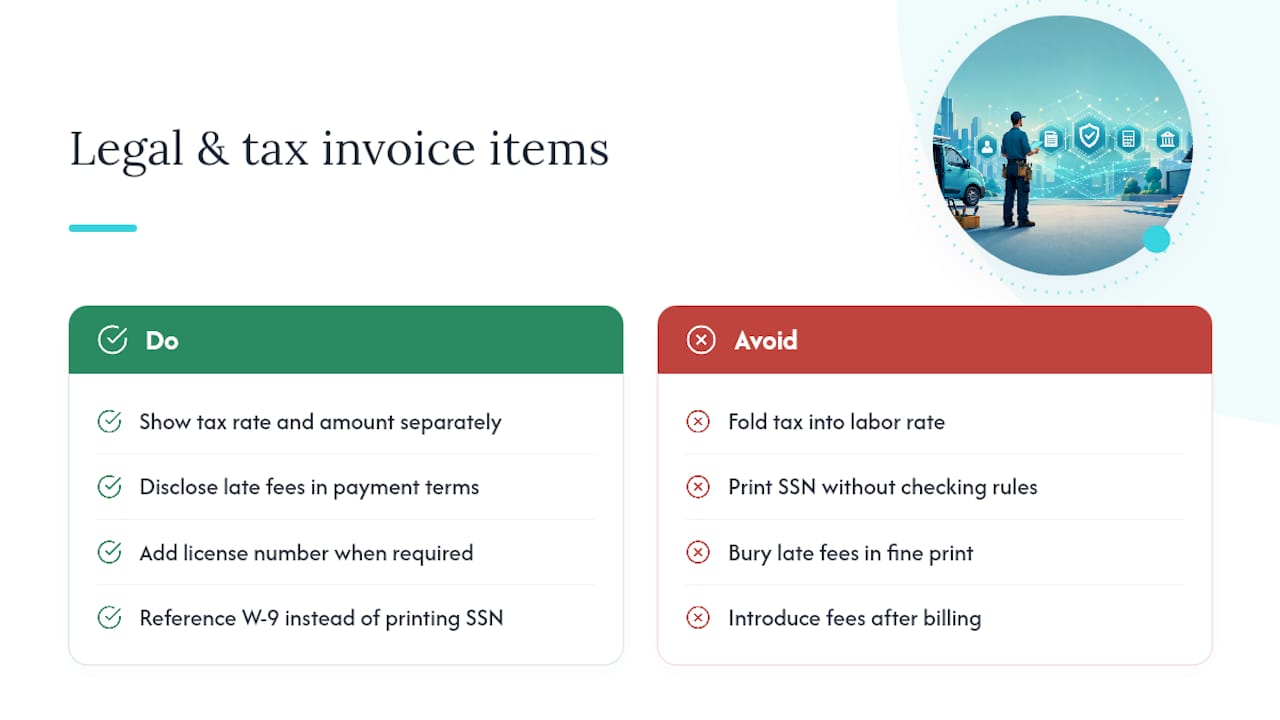
If you're required to collect sales tax on labor or materials in your state, show the tax rate and the tax amount as separate line items, not folded into your labor rate. That keeps your books clean and keeps you covered if a client or auditor ever asks how you calculated it. If you operate as a sole proprietor using your Social Security number for tax purposes instead of an EIN, check your state and client requirements before putting that number on an invoice. Many contractors instead reference a W-9 already on file with commercial clients rather than printing sensitive numbers on every bill.
Late fees and interest charges need to be disclosed on the invoice itself, ideally in the payment terms line, not buried in fine print or introduced after the fact. A few states cap the interest rate you can charge on overdue invoices, so it's worth a quick check of your state's rules before setting that number.
If you're licensed (electrical, HVAC, and plumbing trades often require it), some states or municipalities expect your license number printed on invoices and estimates. This isn't universal, but it's common enough that it's worth confirming with your local licensing board once, then adding it to your saved template so you never have to think about it again.
None of this requires a lawyer. It requires five extra minutes the first time you build your template, and then it's baked in for every invoice after that.
How Do You Customize Invoice Templates by Trade?
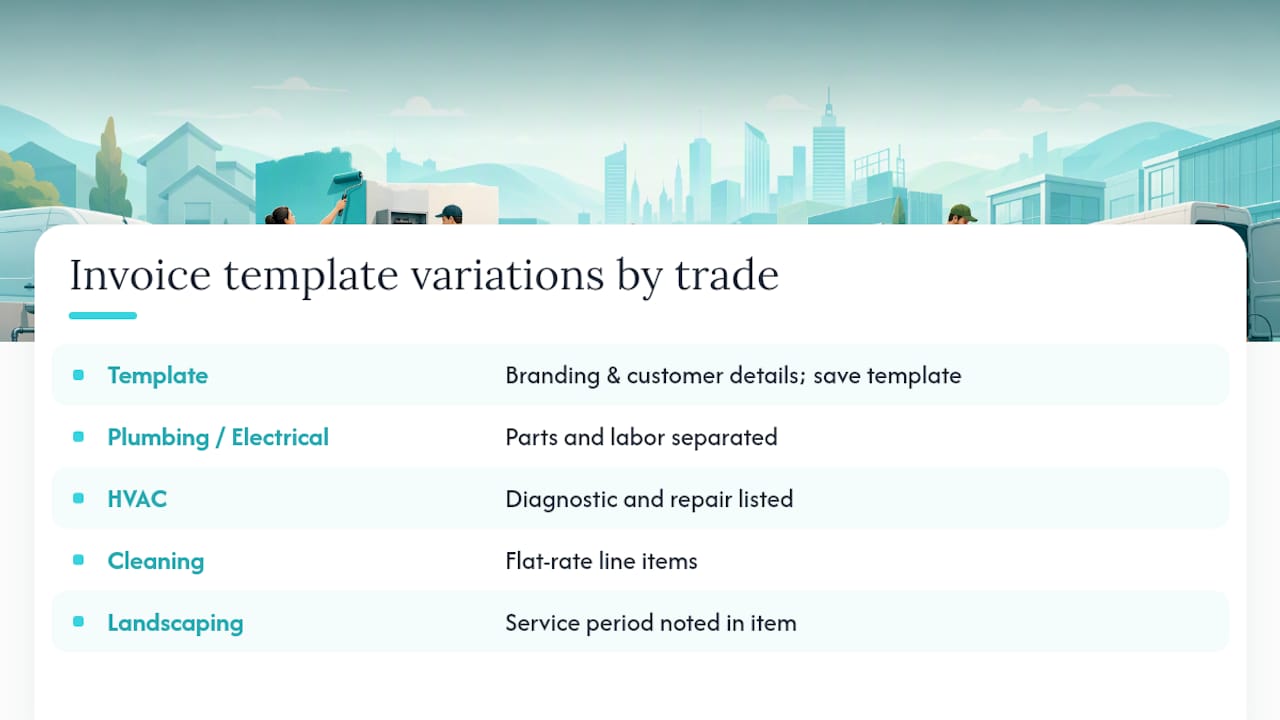
A landscaper's invoice and an electrician's invoice shouldn't look identical, because the information clients care about is different in each trade.
For plumbers and electricians, line items should call out parts and labor separately, since clients often want to know what they paid for the part versus the visit. A plumber-specific invoicing approach usually breaks down fixture cost, labor time, and any emergency or after-hours surcharge as its own line.
For HVAC techs, seasonal maintenance visits benefit from a template that separates diagnostic fees from repair costs, since clients frequently ask why a "simple filter check" cost as much as it did. A dedicated HVAC invoicing format handles this by listing the diagnostic visit and any part replacement as distinct charges.
For handypersons and cleaning businesses, a simpler flat-rate line often works better than an hourly breakdown, especially for recurring clients who just want to see "Monthly deep clean, 3-bedroom home" and a total.
For landscapers, seasonal contracts benefit from a template that notes the service period (spring cleanup, weekly mowing, fall leaf removal) right in the line item, so clients renewing next season can see exactly what they're paying for without asking.
The template structure stays the same across trades. What changes is the vocabulary in your line items and which fees you break out separately. Set that vocabulary once per service type, save it as a template, and you'll never rebuild it from scratch again.
Why a Simple Quote to Invoice Flow Matters for Solo Tradespeople
Most solo tradespeople lose money not on the job itself, but on the paperwork gap between finishing the work and getting paid for it. Every hour spent chasing a payment or manually rebuilding an invoice is an hour you didn't spend on a paying job.
Turning a completed job straight into a branded invoice with a payment link attached removes most of that gap. You skip the "let me build this from scratch" step, and the client gets a professional-looking bill while the job is still fresh in their mind. Saved templates, automated reminders, and integrated payment links help solo tradespeople collect payments faster by cutting out the manual follow-up that eats a whole afternoon.
The invoice is also a marketing moment most tradespeople overlook entirely. A branded, professional invoice is the last thing a client sees from you before they decide whether to leave a review or call you again next season. Treat it like the closing argument for your business, not an afterthought you rush through at 9 p.m. after a long day.
— jaras
Quotewren: Fast Branded Invoices With Pay Links and Review Requests Built In
Some tools combine quoting, invoicing, and review requests into a single flow to simplify the process from job completion to payment and follow-up.

Here's how it works in practice. You send a quote with your logo and colors already applied. The client approves it, and that quote converts straight into a branded invoice with a payment link attached, no retyping line items or rebuilding the layout. Once the invoice is paid, an automatic review request can be sent, so you don't have to remember to ask for a Google review days later when you're busy with other work. Contractors who follow up right after payment tend to see more completed reviews than those who ask days later or forget entirely, simply because the request lands while the job is still top of mind.
If you're a solo plumber, electrician, HVAC tech, or handyperson tired of managing multiple tools for templates, payments, and reviews, you might consider an all-in-one solution like Quotewren. Start a free trial at Quotewren and send your next invoice from one place.
Templates and Tools Worth Bookmarking
A few pages worth keeping handy while you set up your branded invoice: Canva's invoice templates for brand kit basics, Square's free invoice templates for format comparisons, and Adobe Express's invoice generator for quick drag-and-drop edits.
Sources
FAQ
Is There a Free Invoice Creator Available?
Yes. Several tools, including Canva, Adobe Express, and Square, offer free invoice templates with logo upload and PDF export, and Quotewren offers a free trial that includes branded invoice creation for solo tradespeople.
Does Google Have a Free Invoice Generator?
Google Docs and Google Sheets both offer basic invoice templates you can customize with your logo and colors, though they lack built-in payment links or automated reminders that dedicated invoicing tools provide.
Do I Need an LLC to Create an Invoice?
No. Sole proprietors and freelancers can invoice clients using their own name and Social Security number or an EIN; forming an LLC is a separate business decision unrelated to whether you can legally send invoices.
What Is the Best App for Creating Invoices?
The best app depends on your needs: quick one-off tools work for occasional invoicing, while solo tradespeople who want a full quote-to-invoice-to-review workflow with payment links built in tend to prefer a tool like Quotewren built specifically for that flow.
How Do I Add My Logo to an Invoice?
Most template tools have an upload button for your logo, letting you save it along with your brand colors in a brand kit so every future invoice applies it automatically without extra setup.