

The fastest way to accept online invoice payments today is to send a hosted pay link by text or email the moment a job is done. Your customer taps the link, pays by card or bank transfer from their phone, and funds land in your account, often by the next business day.
Get started in three steps:
- Connect your bank account to a payment-enabled invoicing platform.
- Create a branded invoice with an embedded pay link and send it by SMS or email.
- Enable automatic reminders so follow-ups go out without you lifting a finger.
Quotewren is built for exactly this workflow. It takes a finished job from quote to invoice to paid, then automatically asks your customer for a Google review, all without extra admin on your end.
Key Takeaways
Accepting online invoice payments with a hosted pay link and automated reminders is the fastest way for solo tradespeople to get paid and reduce admin.
| Point | Details |
|---|---|
| Send pay links immediately | Text or email a hosted invoice with a pay link the moment the job is done. |
| Offer ACH for large invoices | ACH fees are far lower than card rates on invoices over $500, protecting your margin. |
| Enable digital wallets | Apple Pay and Google Pay cut checkout to under 10 seconds, reducing abandoned payments. |
| Automate reminders | Set reminders for one day before and one day after the due date to recover overdue invoices passively. |
| Use Quotewren for the full loop | Quotewren handles quotes, invoices, pay links, and automated Google review requests in one flat-rate plan. |
Table of Contents
- How do online invoice payments actually work?
- Which payment methods work best for invoice payments?
- Why does accepting payments online help your business?
- How to set up online invoice payments in under an hour
- What fees should you expect for online invoice payments?
- Is your payment setup actually secure?
- How do you reconcile payments and keep your books clean?
- Why Quotewren works well for U.S. solo tradespeople
- Practical tips to get paid faster on every invoice
- How to handle payment disputes and chargebacks
- Why Quotewren was built for the way tradespeople actually work
- Quotewren makes the whole payment cycle simple
- Sources
- FAQ
How do online invoice payments actually work?
When you send an invoice with a pay link, your customer gets an email or text with a button that opens a hosted invoice page. That page is secure, lives on your payment provider's servers, and never requires the customer to create an account or download an app. PayPal's invoicing works this way, letting customers pay by card, ACH, or digital wallet without logging in to any proprietary system.
Here is the basic flow from your side to cleared funds:
- You finish the job and generate an invoice with a pay link.
- The customer receives the invoice by text or email.
- They open the hosted page, choose a payment method, and enter their details.
- The payment processor handles authorization and encryption.
- Funds settle to your connected bank account, typically within one to two business days for cards and two to four for ACH.
What the customer sees and does:
- A clean, branded invoice showing the job description, amount, and due date.
- A "Pay Now" button that opens a secure checkout page.
- A choice of payment method (card, bank transfer, or wallet).
- A confirmation screen and email receipt once payment clears.
The customer never sees your bank account number. The payment processor handles all sensitive data on their end.
Pro Tip: Before you send your first real invoice, open the pay link on your own phone at the job site. Confirm the page loads fast, the amount is correct, and the "Pay Now" button works. A broken link on a $2,000 HVAC invoice is a bad first impression.
Which payment methods work best for invoice payments?
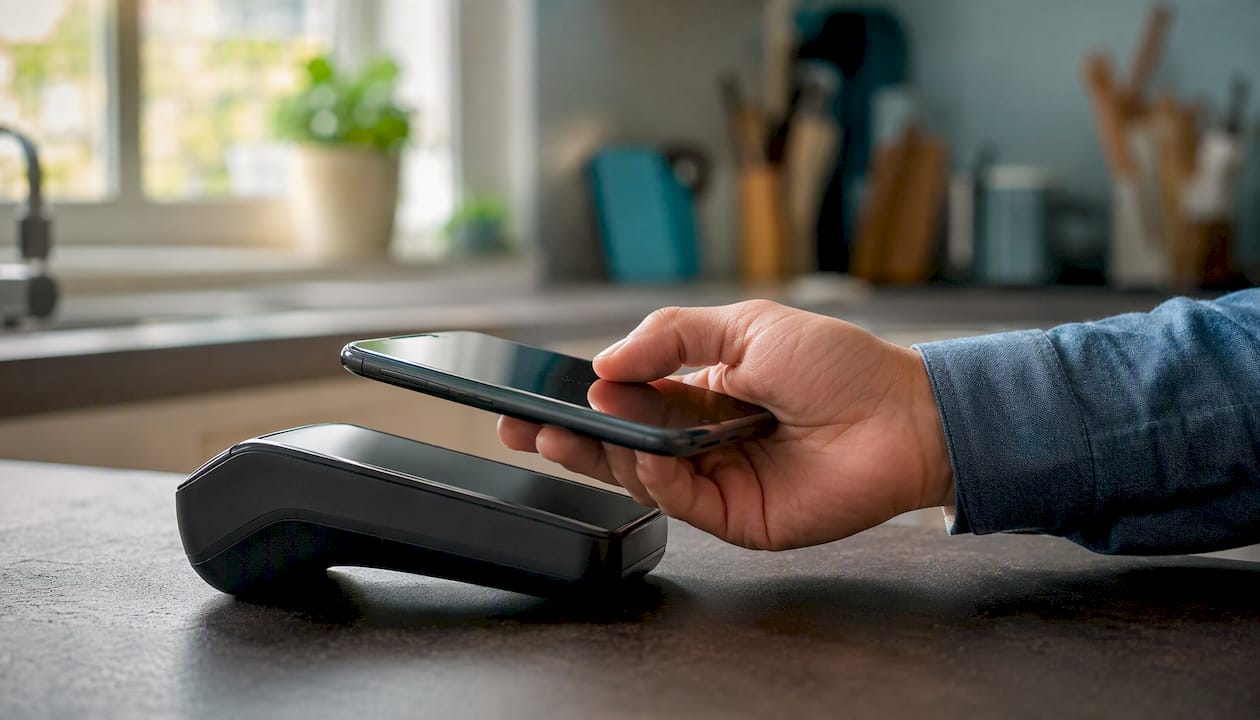
Authorize and most major payment gateways support credit and debit cards, eChecks, and digital wallets like Apple Pay and Google Pay for secure online checkout. Choosing the right mix depends on your typical invoice size and your customers' habits.
| Method | Speed | Typical cost | Best for |
|---|---|---|---|
| Credit/debit card | 1–2 business days | typical fees per transaction apply | Any invoice; highest customer convenience |
| ACH / eCheck | 2–4 business days | usually low flat or capped fees | Large invoices ($500+); lowers your fee |
| Digital wallet (Apple Pay, Google Pay) | 1–2 business days | Same as card | On-the-spot payments; fastest checkout |
| PayPal | 1–3 business days | standard fees apply for invoiced payments | Customers who already have PayPal |
| Wire transfer | Same day or next day | sender fees typically apply | Very large commercial jobs only |
A few practical notes:
- Cards are the default for most residential trade customers. They expect it, and the friction is low.
- ACH makes sense when the invoice is large enough that a 2.9% card fee would cost you more than the ACH flat rate. On a $3,000 landscaping job, the difference is roughly $87 vs. $1.50.
- Digital wallets remove the bottleneck of typing card numbers, which is why Stripe's research points to one-click wallet options as the top conversion driver for hosted invoice pages.
- Wire transfers are rarely worth the friction for residential work. Reserve them for commercial clients who insist on it.
For most solo tradespeople, enabling cards plus ACH covers the full range of customers without overcomplicating the checkout page.
Why does accepting payments online help your business?
The biggest practical benefit is speed. Pay links let customers pay from a phone within minutes of receiving the invoice, and funds often post faster than a paper check would clear. Stripe's invoicing data shows that hosted pages combined with automated reminders improve both payment rates and collection speed.
For solo tradespeople, that speed translates directly:
- Plumber: Finishes a water heater swap, texts the invoice from the driveway, and gets paid before leaving the neighborhood.
- Electrician: Sends a panel upgrade invoice with a pay link after the inspection passes. No chasing a check two weeks later.
- HVAC tech: Invoices a seasonal tune-up on the spot. Customer pays by Apple Pay in under a minute.
- Landscaper: Sends a monthly maintenance invoice automatically. ACH keeps the fee low on a recurring $400 job.
- House cleaner: Texts a pay link after every visit. No cash handling, no trips to the bank.
Beyond speed, there are real admin savings. Fewer lost checks, no manual deposit runs, and automatic reconciliation when your invoicing platform syncs with your accounting software. Concur Invoice notes that automating invoicing and approvals reduces errors and gives better visibility into payment status, a benefit that scales even for one-person operations.
Accepting payments online also builds a paper trail automatically. Every transaction gets a unique ID, a timestamp, and a payer record. That documentation matters if a dispute ever comes up.
How to set up online invoice payments in under an hour
You do not need a developer or a complicated integration. Most payment-enabled invoicing platforms walk you through setup in a few screens.
- Create your account on your chosen platform and verify your identity (government ID and business details are standard).
- Connect your bank account using your routing and account numbers or a bank-linking tool. This is where your payouts land.
- Enable payment methods. Turn on cards as a minimum. Add ACH if your invoices regularly run over $500.
- Build your invoice template. Add your business name, logo, and contact info. Set your standard payment terms (Net 7 or Net 14 works well for trades).
- Send a $1 test invoice to your own email or phone. Complete a card payment and a wallet payment. Confirm the transaction shows up in your dashboard with a transaction ID.
- Refund the test payment from your dashboard to confirm the refund flow works.
- Enable automatic reminders. Set a reminder for one day before the due date and one day after. Most platforms let you customize the message.
Pro Tip: Your first real payout may be held for 2–7 days while the processor verifies your account. This is normal. After a few successful transactions, payouts typically move to a standard 1–2 business day schedule. Plan your cash flow around that first hold.
A note on timing: card payments usually settle in one to two business days. ACH takes two to four. Wire transfers can post the same day but require the sender to initiate from their bank. Invoice payment terms guidance from the HVAC industry recommends setting clear due dates on every invoice, which reduces the need to chase payment manually.
What fees should you expect for online invoice payments?
Fees vary by method and platform, but the main categories are predictable.
Fee types to know:
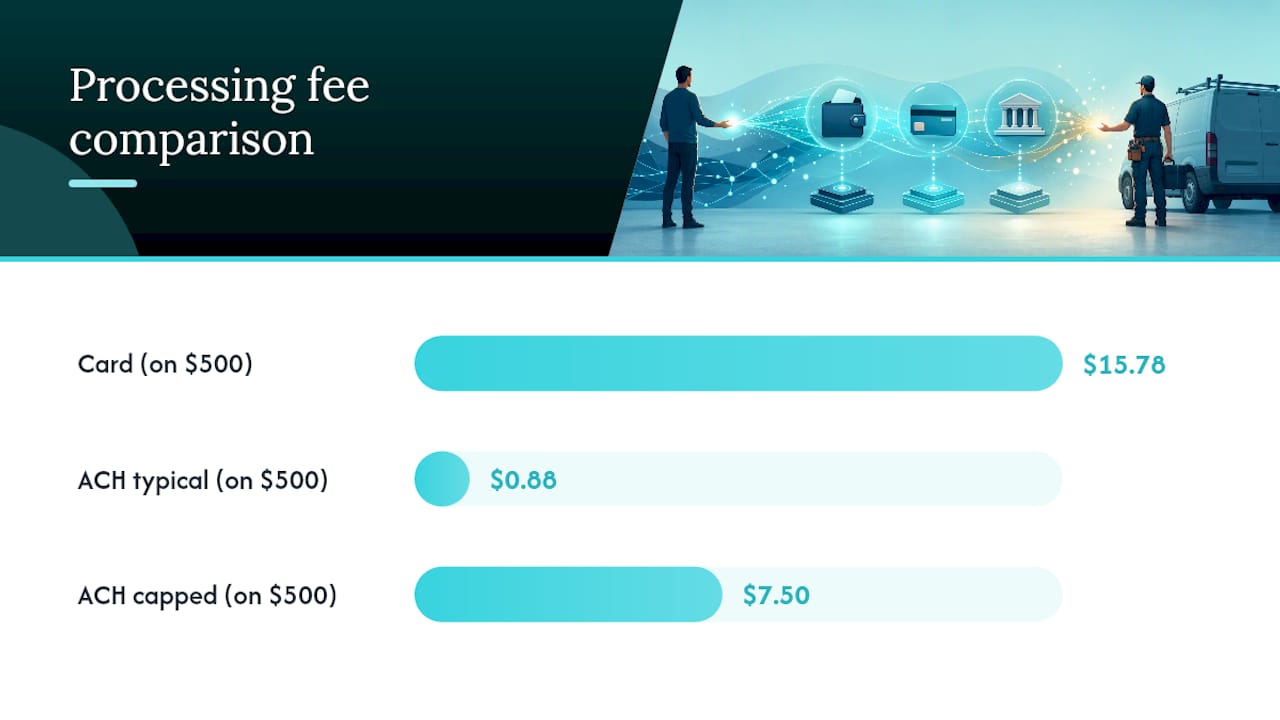
- Per-transaction percentage: Typically 2.7%–3.5% for cards. This is the biggest cost for most tradespeople.
- Per-transaction flat fee: Often $0.25–$0.30 added to the percentage. Matters more on small invoices.
- ACH / eCheck fee: Usually $0.25–$1.50 flat, or a percentage capped at around $5–$10. Much cheaper than cards for large invoices.
- Monthly platform fee: Some platforms charge a flat monthly subscription; others are pay-as-you-go.
- Chargeback fee: Typically $15–$25 per dispute, charged even if you win.
- Refund fee: Some processors keep the original transaction fee even when you refund.
Card vs. ACH in plain numbers:
On a mid-sized HVAC invoice, card fees are significantly higher than ACH fees, making ACH more cost-effective for larger jobs. That gap grows fast on larger jobs. Offering ACH as an option for invoices over $500 is one of the simplest ways to protect your margin.
On surcharging: some businesses pass card fees to customers as a line item. Be careful here. Several U.S. states regulate or prohibit surcharging consumers for card payments. A cleaner approach is to price your services to absorb average processing costs, or offer a small discount for customers who pay by bank transfer. Check your state's rules before adding any surcharge to an invoice.
Is your payment setup actually secure?
Short answer: yes, if you use a reputable platform that handles PCI compliance on your behalf. You should never store raw card numbers yourself, and you should never need to.
Security checklist for any platform you consider:
- PCI DSS compliance: The platform must be certified at Level 1 or Level 2. This means they meet the Payment Card Industry Data Security Standard for storing and transmitting card data.
- Encryption in transit: All data between your customer's browser and the payment server must travel over TLS (the "https" in the URL).
- Tokenization: The platform replaces the real card number with a token for any stored payment method. Even if their database were breached, the token is useless without the decryption key.
- Hosted invoice pages: Because the payment form lives on the processor's server, your customer's card data never touches your system. You never see it, never store it, and are never responsible for it.
- Fraud detection: Look for basic velocity checks and address verification (AVS) as standard features.
Stripe's platform handles encryption and PCI compliance so small businesses never store raw card data on the seller side. That is the right model. Your job is to pick a platform that does this well, not to build the security layer yourself.
One more note on surcharging and state rules: beyond the cost question above, some states have specific disclosure requirements even where surcharging is technically allowed. Consult your state's consumer protection office or a business attorney before passing fees to customers.
How do you reconcile payments and keep your books clean?
Reconciliation sounds complicated, but the core task is simple: match each bank deposit to the invoice it came from. Most payment-enabled invoicing platforms do this automatically when you connect them to your accounting software.
What to match for each transaction:
- Invoice ID (from your invoicing platform)
- Transaction ID (from the payment processor)
- Amount received (after fees, if the platform deducts fees before payout)
- Payment date vs. invoice date
Three steps to match a bank deposit to an invoice:
- Open your invoicing platform and find the invoice marked "paid."
- Copy the transaction ID and search for it in your bank or accounting software.
- Mark the invoice as reconciled and note any fee deducted so your books show the gross amount invoiced and the net amount deposited separately.
QuickBooks, FreshBooks, and similar tools can sync directly with most invoicing platforms, pulling in paid invoices and posting them to the right income account automatically. AP automation platforms like Payhawk connect invoice capture, approvals, and payment execution to reduce manual work and speed payment cycles, a useful model even for smaller operations as volume grows.
For more structured digital invoice processing, ELO Invoice supports common eInvoice standards and automates classification and archiving, which matters for businesses that need audit-ready records. Coupa's AP automation takes a similar approach, using AI-powered capture and automated matching to reduce manual entry and meet compliance requirements.
If you prefer to hand off reconciliation entirely, outsourced invoicing support from an accounting firm can manage follow-ups and reconciliation for tradespeople who would rather focus on the work.
Why Quotewren works well for U.S. solo tradespeople
Quotewren is built around the way trade jobs actually flow: you finish the work, you need to get paid, and you want a review on Google before the customer forgets about you.
What the workflow looks like in practice:
- Build a quote from your phone or laptop using branded templates.
- Convert the approved quote to an invoice in one tap.
- Send the invoice with an integrated pay link by SMS or email.
- The customer pays from their phone, no account required.
- Quotewren automatically sends a three-touch review request by SMS after payment clears.
Here is a concrete example. A plumber finishes a water heater replacement on a Friday afternoon. He opens Quotewren, converts his quote to an invoice, and texts it to the homeowner from the driveway. The homeowner pays by card before the plumber reaches the highway. By Monday morning, the funds are in the plumber's account and the customer has already received the first review request. No chasing, no paperwork, no forgotten follow-up.
Quotewren's pricing is flat monthly tiers with a free trial that includes a limited number of documents. There are no long-term contracts and no per-seat fees for a solo operator. Try Quotewren to see the full workflow before you commit to a paid plan.
Practical tips to get paid faster on every invoice
Speed comes from removing friction at every step. Here is what actually moves the needle:
- Use a hosted pay link, not a bank transfer request. Customers pay faster when they can tap a button than when they have to log in to their own bank and enter your routing number.
- Offer ACH for invoices over $500. Mention it in the invoice notes: "Save time with bank transfer." Many customers prefer it once they know it is an option.
- Keep the invoice simple. Job description, amount, due date, and a single "Pay Now" button. Every extra line is a reason to pause.
- Confirm the customer's mobile number before you leave the job. A text lands faster than an email for most residential customers.
- Enable automatic reminders. Set one for the day before the due date and one for the day after. Most overdue invoices are just forgotten, not disputed.
- Set clear payment terms. Net 7 is standard for residential trade work. Net 30 is too long for a solo operator's cash flow.
Pro Tip: Enable Apple Pay and Google Pay on your hosted invoice page. Customers who pay by wallet skip the card-entry screen entirely, which cuts checkout time to under 10 seconds. Faster checkout means fewer abandoned payments.
On follow-up cadence: two reminders cover most situations. A third reminder, sent about a week after the due date, is worth adding for invoices over $1,000. After that, a phone call is more effective than another automated message.
How to handle payment disputes and chargebacks
A chargeback happens when a customer contacts their card issuer to reverse a charge instead of coming to you directly. It is different from a refund you initiate yourself. The card network pulls the funds from your account while the dispute is investigated, and you typically have 7–21 days to respond with evidence.
What to do when a chargeback arrives:
- Respond quickly. Missing the response window means an automatic loss, regardless of the facts.
- Gather your evidence. Collect the signed quote or work order, the invoice, any text or email confirming the job, and photos of the completed work. A customer's payment confirmation email is strong evidence.
- Submit through your payment platform. Most processors have a dispute portal where you upload documents and write a short summary.
- Know the likely outcome. Chargebacks for "services not rendered" are the most common in the trades. Clear documentation of the completed job, especially photos and a signed work order, gives you the best chance of winning.
Prevention matters more than response. A few habits reduce chargeback risk significantly: get a signed quote before starting work, send a completion photo with the invoice, and make sure your business name on the customer's card statement matches what they expect to see. A charge from an unfamiliar business name is one of the most common triggers for a "I don't recognize this charge" dispute.
Chargeback fees are charged per dispute, regardless of outcome, and can be significant for small invoices. For high-ticket jobs, that cost is manageable. For small invoices under $100, a chargeback can wipe out your margin entirely, which is one more reason to use clear, documented invoicing from the start.
Why Quotewren was built for the way tradespeople actually work
The trades run on trust and speed. A customer who just had their furnace fixed at 9 PM is not going to mail you a check. They want to tap a button and be done. Quotewren was designed around that reality: get the invoice out fast, make it easy to pay, and capture the review while the job is still fresh. The quote-to-invoice-to-review loop is not a feature stack. It is the daily workflow of every solo tradesperson who wants to grow without hiring an office manager.

Quotewren makes the whole payment cycle simple
If you are tired of chasing checks and forgetting to ask for reviews, Quotewren gives you a cleaner path. You get branded invoice templates, integrated pay links, and a three-touch automated review request by SMS, all in one flat monthly subscription with no long-term commitment.

Sign up for a free trial at Quotewren and send your first branded invoice with a live pay link today. The trial includes a limited number of documents so you can test the full workflow before choosing a paid plan.
Sources
- Authorize
FAQ
How do I pay an online invoice?
Open the pay link in the email or text you received, choose your payment method (card, bank transfer, or digital wallet), and complete checkout. No account or app is required on most platforms.
What is the safest way to pay an invoice online?
Use a hosted invoice page from a PCI-compliant processor. These pages encrypt your card data in transit and never store your raw card number, so your information stays protected.
What is the best online invoicing service for solo tradespeople?
Quotewren is built specifically for solo tradespeople, combining branded invoices, integrated pay links, and automated Google review requests in one flat monthly plan with no long-term contract.
What is the best free invoice app?
Several platforms offer free tiers with limited invoices, including PayPal and Wave. For tradespeople who also want automated review requests and branded quotes, Quotewren's free trial covers the full workflow before any payment is required.