

The best payment reminder email subject front-loads two things: a clear identifier and the next action. Use this formula: [Context] + Invoice #[Number] + [Due date or status], like "Invoice #204 due Friday" or "Past due: Invoice #187." It works because whoever opens your email, whether that's your client or their bookkeeper, knows instantly what it's about and what to do. Everything below gives you the exact wording, stage by stage.
TL;DR:
- Payment reminder email subjects should combine the invoice number with the due date or status to ensure immediate clarity for any recipient.
- Use stage-specific subject lines, starting with friendly reminders, moving to factual overdue notices, and ending with firm final warnings, to match the invoice age.
- Keep subject lines concise under 50 characters, avoid all caps or excessive punctuation, and include the invoice number and payment status at the beginning.
- Always ensure your language accurately reflects your policies, avoiding misleading terms like "final notice" unless you are prepared to follow through with escalation.
- Automating the reminder sequence with consistent templates and staged wording minimizes decision fatigue and maximizes prompt payment.
Table of Contents
- Why the payment reminder email subject formula works
- Stage-by-stage subject lines you can copy right now
- Length, spam triggers, and getting your subject noticed on a phone
- Subject and opener pairs built for tradespeople
- How often to follow up and when to change your subject line
- Staying on the right side of the law with your wording
- Writing reminders that work across different clients and cultures
- Testing your subject lines to see what actually gets opened
- Letting automation handle your subject lines and follow-up timing
- What actually moves the needle for solo tradespeople
- Automate your quotes, invoices, and reminders with Quotewren
- Sources
- FAQ
Why the payment reminder email subject formula works
Here's the formula broken into pieces so you can build your own: [Context] + Invoice #[Number] + [Due date or status]. Each part earns its spot.
- Context tells the reader why they're getting this email. Words like "Reminder," "Following up," or the job name ("Kitchen faucet repair") set the tone before they even open it.
- Invoice #[Number] is the anchor. Anyone forwarding your email to accounts payable, or searching their inbox later, needs that number to find the right file fast.
- Due date or status answers the question in the reader's head the second they see your name pop up: "Do I owe money right now?"
Should you put the dollar amount in the subject line? Only sometimes. If you're invoicing a property manager or a business that routes payments through an office, adding the amount ("$450 due 3/14") helps the person forwarding it to accounts payable skip a step. For a homeowner who already knows what the job cost, the amount is just clutter. Skip it.
One rule that's easy to miss: never put sensitive account numbers, bank details, or personal information in a subject line. Subject lines get forwarded, previewed on lock screens, and sometimes indexed by email search tools. Keep the invoice number, keep the due date, and leave anything truly private for the body of the email or a secure payment link.
Stage-by-stage subject lines you can copy right now
Your tone should shift as the invoice ages. A friendly nudge before the due date reads very differently than a subject line for an invoice that's 45 days late, and it should. Below are subject lines grouped by stage, ready to copy into your next email.
-
Pre-due (sent 2 to 3 days before the invoice is due). Keep this stage light and helpful. You're not chasing anyone yet, just keeping the invoice visible.
- "Friendly reminder: Invoice #118 due Thursday"
- "Quick note: Invoice #118 due in 3 days"
- "Upcoming payment: Invoice #118 ($320)"
-
Due today. Short and factual works best here. No need to add pressure yet.
- "Invoice #118 due today"
- "Due today: Invoice #118"
- "Payment due: Invoice #118, $320"
-
Early overdue (1 to 10 days past due). State the fact plainly. This is where clarity beats cleverness, and vague subjects like "Checking in" cost you time.
- "Past due: Invoice #118"
- "Invoice #118 is now overdue"
- "Overdue reminder: Invoice #118, due 3/10"
-
Second and firm reminders (10 to 30 days past due). The tone tightens, but you're still professional. This is where you can reference a prior email without sounding aggressive.
- "Second notice: Invoice #118 still unpaid"
- "Invoice #118: Payment needed to continue service"
- "Following up again: Invoice #118 (30 days overdue)"
-
Final notice or escalation (only when your policy supports it). Save strong language for when you mean it. If you send a "final notice" and then send three more reminders after that, your next real final notice loses its weight.
- "Final notice: Invoice #118 before late fee applies"
- "Action needed: Invoice #118 past due 45 days"
- "Invoice #118: Please respond by Friday"
Template libraries built around stage-based subject sequences consistently recommend this same pre-due, due, overdue, escalation structure, and it lines up with what most solo trades businesses actually need: a short, repeatable script instead of writing a new email from scratch every time. A well-documented set of polite subject-line variations also backs up using softer language like "Friendly reminder" in that first stage rather than jumping straight to "past due" language.
Pro Tip: Save these five subject lines in a notes app or your invoicing tool so you're not rewriting them under pressure when a client goes quiet. Consistency matters more than creativity here.
Length, spam triggers, and getting your subject noticed on a phone
Most of your clients read email on a phone, which means your subject line gets cut off after roughly 40 to 50 characters. If the important part, your invoice number and the word "due" or "overdue," gets chopped off, you've lost the whole point of a clear subject.
- Keep subject lines under about 50 characters and put the invoice number and status near the front, not buried at the end.
- Skip ALL CAPS. It reads as shouting and triggers spam filters more often than lowercase or title case text.
- Avoid stacking punctuation like "!!!" or "URGENT!!!" especially in early reminders. Overusing urgent language before it's actually urgent, as invoice reminder guides point out, trains clients to ignore you when things really do get serious.
- Personalize with a company name or job description ("Smith kitchen remodel") when it helps a client remember which job you mean, especially if you've done multiple jobs for them.
- Match your escalation language to what you'll actually do. If your invoice terms include a late fee at 30 days, don't write "final notice" at day 10.
The Consumer Financial Protection Bureau's guidance on billing communication reinforces a simple point that applies to any small business sending payment reminders: your subject line and message need to reflect reality. If you call something a "final notice," you should be prepared to follow through, and if you're not planning to charge a late fee, don't hint that you might.
Pro Tip: Read your subject line out loud as if you're the client. If it sounds like a threat instead of a reminder, soften it, especially before day 30.
Subject and opener pairs built for tradespeople
Pairing the right subject line with a matching first sentence saves you from writing a whole new email every time. Here are copyable pairs, built around real trade scenarios, with the payment link placed where it belongs, right after the ask.
-
Plumber, pre-due: Subject: "Friendly reminder: Invoice #204 due Friday." Opener: "Hey Mark, just a quick note that the invoice for your sink repair is due Friday. Here's the link to pay whenever works: [pay link]."
-
Electrician, due today: Subject: "Invoice #97 due today, panel upgrade." Opener: "Hi Denise, your invoice for the panel upgrade is due today. You can pay directly here: [pay link], no need to write a check."
-
HVAC tech, early overdue: Subject: "Past due: Invoice #312, AC repair." Opener: "Hi Tom, I noticed Invoice #312 for the AC repair is a few days past due. If you've already sent payment, thanks, just let me know. Otherwise, here's the link: [pay link]."
-
Handyman, second reminder: Subject: "Second notice: Invoice #56 still open." Opener: "Hi Priya, following up again on Invoice #56 for the deck repair, now about two weeks past due. Let me know if there's an issue on your end, otherwise you can settle it here: [pay link]."
-
Landscaper, firm reminder: Subject: "Invoice #180: Payment needed to schedule next visit." Opener: "Hi Carl, Invoice #180 for last month's mowing is still outstanding, and I want to get it cleared before your next scheduled visit. Pay link is here: [pay link]."
-
Cleaning business, final notice: Subject: "Final notice: Invoice #421 before late fee applies." Opener: "Hi Renee, this is a final reminder that Invoice #421 is 45 days overdue. Per our agreement, a late fee applies after this notice. Please pay here: [pay link] or reach out if you'd like to discuss."
Notice the pattern: every opener repeats the invoice number from the subject, restates the amount or job briefly, and puts the pay link right where the client's eyes land next. That's not an accident. Guides on invoice reminder structure consistently point to a single clear ask with the invoice number and payment link as the combination that actually converts opens into paid invoices, and it matches what shows up in a practical invoice reminder setup guide for solo tradespeople as well. If you haven't settled on a numbering system yet, an invoice numbering template makes this whole process easier since every subject line depends on that number being easy to find and reference.
How often to follow up and when to change your subject line
You don't need ten different subject lines. Most solo tradespeople do fine with 3 to 5 variants total, one per stage, reused every time. Here's a cadence that works for most trade invoices:
- Pre-due: 2 to 3 days before the due date.
- Due day: the day payment is expected.
- 3 days late: first overdue nudge.
- 7 to 14 days late: second, firmer reminder.
- 30 days late: final notice, paired with any late fee language your invoice terms actually include.
Should you keep replying in the same email thread, or start fresh with a new subject each time? For individual homeowners, threading works fine, since they can scroll up and see the history. For clients who route invoices through an office or property management company, a fresh subject line at each stage helps their accounts payable team catch it as a new item rather than losing it in a buried thread. If you're building out a fuller cadence, a quote follow-up template guide covers similar timing logic you can adapt for invoices.
Staying on the right side of the law with your wording
Payment reminders aren't just a courtesy email, they're a form of billing communication, and that means the words you choose carry some legal weight. You don't need a law degree to get this right, but you do need to avoid two common mistakes.
First, don't misrepresent the status of an invoice. If you write "final notice" in a subject line, that phrase implies something specific: this is your last reminder before further action, like a late fee or collections. If you send three more "final notices" after that, you've made the phrase meaningless and, depending on your state and any consumer protection language in your contract, potentially misleading. The Consumer Financial Protection Bureau's own reporting on billing practices makes clear that transparent, accurate notices matter, and that principle applies just as much to a solo plumber's invoice email as it does to a bank statement.
Second, only threaten what your contract or invoice terms actually allow. If your invoice doesn't mention a late fee, don't put "before late fee applies" in your subject line. If you haven't stated a collections policy anywhere the client agreed to, don't imply one in your wording. This isn't about being soft, it's about making sure that when you do escalate, your words match your actual terms and hold up if a client ever pushes back.
None of this means your reminders need to sound like a legal notice. Plain, honest language, "Invoice #118 is 30 days overdue" instead of vague threats, keeps you both clear and protected.
Writing reminders that work across different clients and cultures
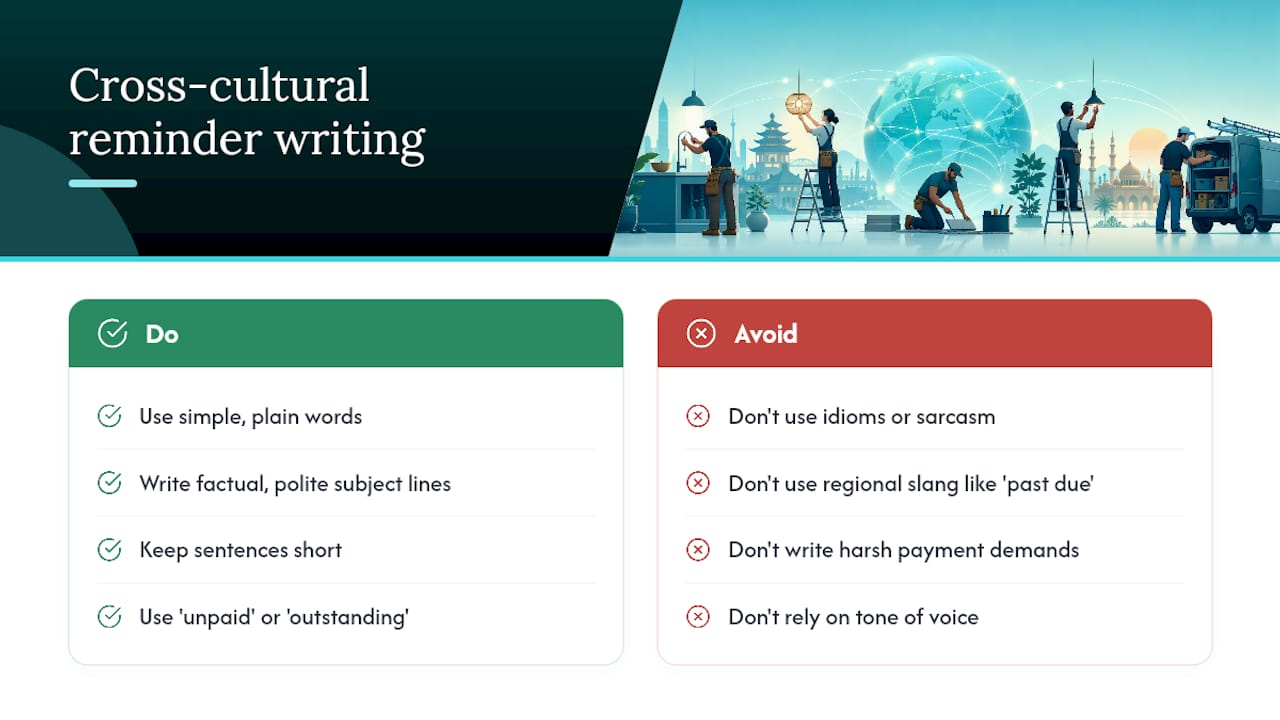
Not every client reads English the same way, and not every culture treats a direct "past due" subject line the same way either. If you work with clients who speak English as a second language, or you do business in a community with a different cultural approach to money conversations, a little adjustment goes a long way.
Simpler words travel better. "Invoice #118 due Friday" is easier to understand at a glance than "Invoice #118 remittance required imminently." Skip idioms, skip sarcasm, and skip anything that depends on tone of voice to land correctly, since none of that survives translation or a quick skim.
Some clients come from business cultures where direct payment demands feel rude even when the invoice is genuinely late. Others expect directness and read a soft "just checking in" subject line as evasive or unserious. You won't always know which camp a client falls into, so a middle ground, factual but not harsh, tends to work broadly: "Invoice #118: payment status check" reads as polite in most cultural contexts while still being clear about what it's about.
If you regularly work with clients whose first language isn't English, keep sentences short in both the subject and the opener. Avoid regional slang like "past due" if you suspect it might not translate clearly, and consider "unpaid" or "outstanding" instead, since those words tend to carry less ambiguity. None of this requires hiring a translator for a $300 invoice, just a habit of writing plainly, which happens to be good practice for every client anyway.
Testing your subject lines to see what actually gets opened
You don't need fancy software to figure out which subject lines work best for your clients. Most solo tradespeople can run a simple test with the tools they already have.
Pick two versions of the same reminder, say "Invoice #118 due Friday" against "Friendly reminder: Invoice #118," and alternate which one you send as you cycle through similar overdue invoices over a month or two. Keep a simple note (a spreadsheet, a notebook, whatever you already use) of which subject line you sent and how fast that client responded or paid.
Over time, patterns show up. You might find that commercial clients respond faster to subjects that lead with the invoice number, while individual homeowners respond better to a friendlier tone in the first reminder. You might also notice that including the dollar amount speeds up payment from clients who forward invoices to a spouse or business partner, but makes no difference for a client paying out of pocket.
This kind of testing isn't about running a controlled experiment, it's about paying attention. If a particular subject line style consistently gets you paid faster, keep using it. If clients seem to ignore a certain phrasing, drop it. The goal isn't a perfect formula, it's a set of 3 to 5 subject lines you trust because you've watched them work.
Letting automation handle your subject lines and follow-up timing
Writing a fresh subject line and opener every time you send a reminder eats into hours you'd rather spend on the job site. This is where connecting your invoicing to automation or a simple CRM setup pays off, even for a one-person operation.
Most invoicing tools let you save subject line templates so the invoice number and due date populate automatically, which means you're not retyping "Invoice #118 due Friday" by hand every time. Some tools go further and let you set a cadence, so the pre-due reminder, the due-day nudge, and the overdue follow-up go out on schedule without you remembering to trigger each one manually.
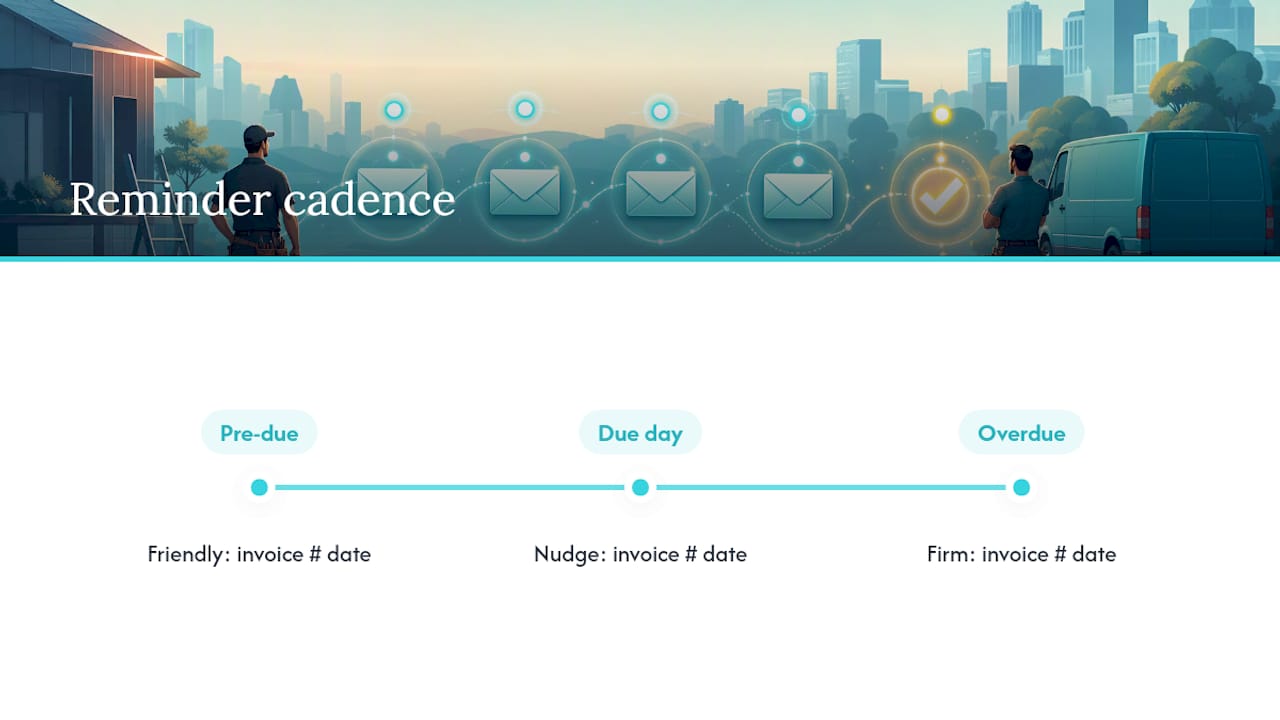
The trick is making sure your automated subject lines still follow the escalation rules covered earlier in this article, friendly at first, factual as it ages, firm only when your policy backs it up. A tool that blasts the same "URGENT" subject line at day 2 and day 60 defeats the purpose of staged reminders. Look for automation that lets you customize wording by stage, not just a single template repeated on a timer.
What actually moves the needle for solo tradespeople
Most advice on payment reminders is written for accounts payable departments processing hundreds of invoices a month. That's not your reality. You've got one job site, one truck, and maybe fifteen minutes between calls to send a reminder before you're back under a sink. What works for you isn't a fancier subject line, it's fewer decisions to make each time you send one.
The tradespeople who get paid fastest aren't the ones agonizing over clever wording. They're the ones who picked three or four subject line templates months ago and stuck with them, so sending a reminder takes thirty seconds instead of ten minutes of second-guessing. Pairing a consistent subject format with a payment link right in the opener removes almost all the friction between a client reading your email and actually paying you.
Automation isn't a luxury here, it's what turns a system that works on paper into one that actually runs while you're on a roof or under a truck.
— jaras
Automate your quotes, invoices, and reminders with Quotewren
Quotewren is built for exactly the workflow this article walks through: you finish a job, turn it into an invoice with one click, send a pay link, and let a preset reminder sequence handle the follow-up so you're not manually retyping subject lines between jobs.

Instead of juggling a notes app full of subject line templates, Quotewren keeps your invoice numbering, due dates, and reminder cadence consistent every time, which is the same discipline this whole article has been pushing: clear identifiers, staged tone, and a payment link that's never more than one click away. It also handles the review request that comes after you get paid, something most invoicing tools skip entirely, which matters if you're trying to build up Google reviews without chasing clients for them separately. If you want to see how the quote to invoice to reminder flow works for a business your size, start with a free trial and run your next few invoices through it.
Sources
FAQ
How do I politely send a payment reminder email?
Lead with a clear, non-aggressive subject line like "Friendly reminder: Invoice #118 due Friday," then open the email by restating the invoice number and due date before including your payment link. Save firmer language for invoices that are genuinely 30 or more days overdue.
What is a good subject line for a reminder email?
The strongest formula is [Context] + Invoice Number + Due date or status, such as "Invoice #204 due Friday" or "Past due: Invoice #118." This structure gives the reader instant clarity without sounding pushy.
What's a good subject line for payment?
For a payment that's due but not yet late, keep it factual and short: "Invoice #97 due today" or "Payment due: Invoice #97, $320." Adding the dollar amount helps when the invoice might get forwarded to someone else for approval.
What is a good payment reminder message?
A good reminder message restates the invoice number and due date, includes a direct link to pay, and matches its tone to how overdue the invoice actually is. Tools like Quotewren can automate this pairing so the subject line and message stay consistent across every reminder stage.
How many follow-up emails should I send before an invoice is seriously overdue?
Most solo tradespeople get good results with four to five touches: a pre-due reminder, a due-day nudge, one at 3 days late, one at 7 to 14 days late, and a final notice around 30 days, each with 3 to 5 rotating subject lines matched to that stage.