

Send the quote, then follow a 3–5 touch sequence: re-surface on Day 2, add value on Day 5, soft-close on Day 10, and send a break-up message on Day 14. That sequence recovers the most stalled quotes for small shops and solo tradespeople, and you can start it today with this one-line template:
Subject: "Quick check — [Project Name] estimate" Body: "Hi [Name], just making sure the estimate for [project] landed okay. Happy to answer any questions or walk you through it. [Your name]"
Three fast subject-line alternatives:
- "Your [Project Name] quote — any questions?"
- "Still available for [Project Name] — wanted to check in"
- "Should I close your file on [Project Name]?"
When to skip email and go straight to SMS or a call:
- SMS first when the prospect gave you a cell number and the job is under a week out
- Phone call when your quote tracker shows they opened the estimate two or more times
- SMS over email for same-day confirmations — SMS open rates run far higher than email, making it the faster channel for time-sensitive nudges
Pro Tip: Write all five touches in one sitting on the day you send the quote. Schedule them in advance so the sequence runs even when you're on a job site.
Key Takeaways
A short, value-added 3–5 touch sequence over 14 days recovers the most stalled quotes for solo tradespeople and small-service businesses.
| Point | Details |
|---|---|
| Start the sequence on Day 0 | Send a delivery confirmation email and SMS the same day you send the quote. |
| Add value at every touch | Each message needs a new angle — a tip, a scope note, or a schedule update — not a repeat ask. |
| Use the break-up email on Day 14 | "Should I close your file?" often triggers a reply because it removes pressure and forces a decision. |
| Track opens before anything else | Multiple quote opens signal buying intent; escalate to a phone call when you see them. |
| Quotewren automates the sequence | Quotewren handles Day 2 SMS, Day 5 reminders, and Day 14 close-your-file messages automatically for solo tradespeople. |
Table of Contents
- Why a quote follow-up actually moves deals
- Which channel should you use and when?
- What does a high-conversion follow-up cadence look like?
- Copy-paste email templates and subject lines for every stage
- Phone and SMS scripts that get fast replies
- How to tailor follow-ups to buyer stage and objections
- What tools should you use to track follow-ups?
- How Quotewren fits a tradesperson's follow-up workflow
- What should you actually measure?
- What to do when a prospect still doesn't respond
- What actually separates the follow-ups that work from the ones that don't
- Quotewren automates the sequence so you can stay on the job
- Sources
Why a quote follow-up actually moves deals
Industry patterns show that a large majority of sales require multiple follow-ups, yet many salespeople stop after the first attempt. For tradespeople, that gap is where most booked jobs disappear.
The reason most quotes die isn't price. It's friction. A prospect gets your estimate, gets pulled into their day, and forgets to reply. One follow-up email that says "just checking in" doesn't fix that. It signals you have nothing new to add.
Value-added follow-ups work differently. When each touch gives the prospect something useful — a clarifying note on scope, a photo of a similar completed job, a heads-up that your schedule fills up in two weeks — you give them a reason to re-open the conversation. Research on service-business follow-up patterns consistently shows that messages adding new information get replies; messages that only ask "did you see this?" train prospects to ignore you.
A few patterns worth knowing:
- Most prospects who eventually book need at least three touches after the initial quote delivery
- The first follow-up should arrive sooner than most contractors feel comfortable — same day or within 24 hours keeps momentum alive
- Scope-down beats discounting: offering to remove a line item protects your margin better than cutting the total price
Which channel should you use and when?
The channel matters as much as the message. Sending a long email when a quick text would do wastes both your time and the prospect's attention.
- Email is the default for quote delivery and value-add touches. It creates a paper trail, supports attachments, and lets you re-send the quote PDF without a phone call.
- SMS is best for short, low-friction nudges when you already have permission to text. Contractor-focused playbooks flag SMS as the highest-open-rate channel and recommend it for same-day delivery confirmation and Day 1 check-ins.
- Phone earns its place on Day 7–10, especially when your tracking shows the prospect opened the quote more than once. A 60-second call at that point feels natural, not pushy.
- LinkedIn fits B2B decision-makers — property managers, general contractors, facility directors — who are active on the platform and may not respond to cold email.
- Physical mail is rarely worth the effort for a standard residential job, but a handwritten note can stand out for a high-value commercial bid.
Timing rules of thumb: Tuesday through Thursday, between 9 AM and 11 AM or 2 PM and 4 PM local time, consistently outperform Monday morning and Friday afternoon sends. Avoid texting before 8 AM or after 7 PM.
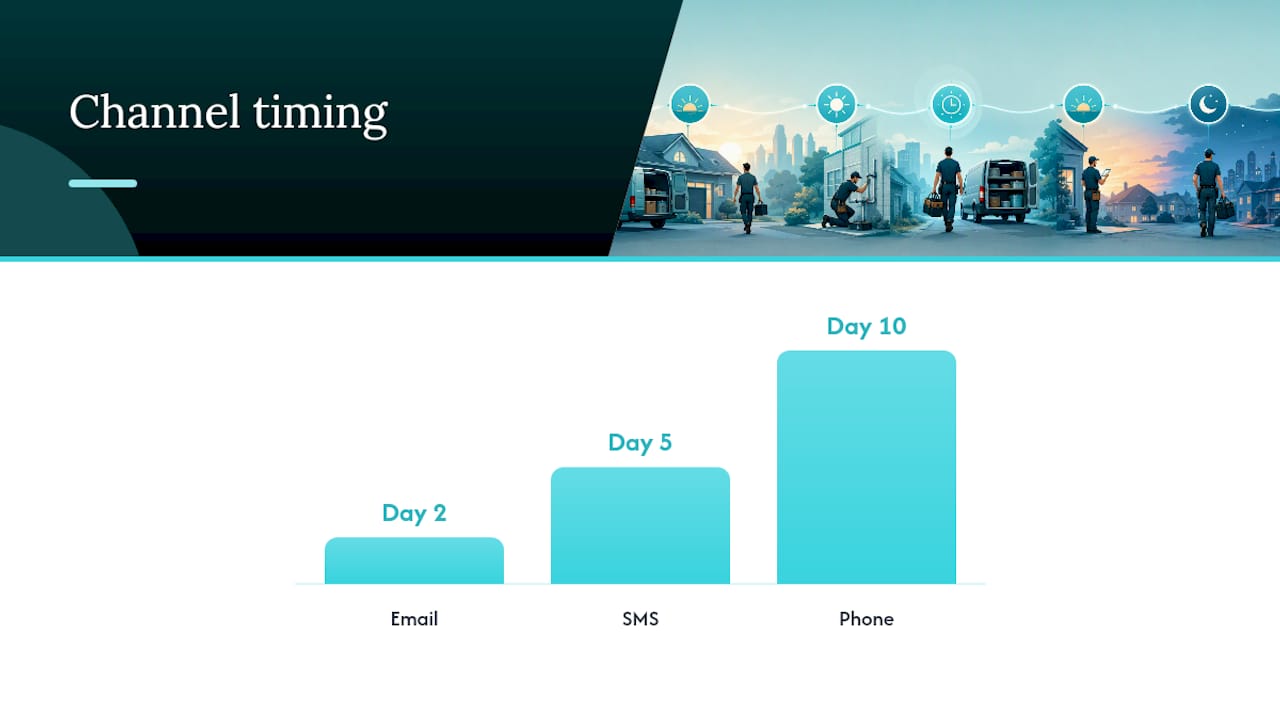
Pro Tip: Vary the channel with each touch. Email on Day 2, SMS on Day 5, phone on Day 10. Changing the medium increases the chance one of them lands at the right moment.
A compliance note: the Telephone Consumer Protection Act (TCPA) requires written consent before sending marketing texts. For tradespeople, the safest approach is to get a quick verbal or written "yes, you can text me" at the estimate appointment and note it in your records. If you're unsure whether you have permission, use email.
What does a high-conversion follow-up cadence look like?
PandaDoc's cadence guidance maps a Day 0 through Day 30 sequence that balances persistence with respect for the prospect's time. Here's a practical version adapted for small-shop tradespeople:
| Touch | Day | Channel | Goal |
|---|---|---|---|
| 1. Delivery confirmation | Day 0 | Email + SMS | Confirm receipt, set expectations |
| 2. Re-surface | Day 2 | Check it landed, invite questions | |
| 3. Value-add | Day 5 | Add a tip, photo, or scope note | |
| 4. Soft close | Day 10 | Phone or email | Ask for a decision or a timeline |
| 5. Break-up | Day 14 | "Should I close your file?" | |
| 6. Nurture | Day 30/60/90 | Seasonal or schedule-opening re-engage |
For high-value jobs (anything over $5,000), add a phone call between Day 7 and Day 10 regardless of opens. For fast-turn projects — a repair or a small install — compress the sequence: Day 0, Day 1, Day 3, Day 7.
Three signals that tell you to escalate the touch type:
- Prospect opened the quote two or more times: move to a phone call sooner
- Prospect clicked a line-item link or attachment: they're comparing; send a scope-clarification note
- No opens after Day 5: re-send with a different subject line before Day 10
A minimal 3-touch automated sequence — re-surface, value-add, soft close — captures most recoverable deals. The full 5-touch version adds the break-up and nurture for higher-stakes jobs.
After Day 14 with no reply, stop active follow-up. Move the contact to a 30/60/90 nurture list and send one short, low-pressure message at each interval.
Copy-paste email templates and subject lines for every stage
Prospeo's template research recommends 3–5 follow-ups over 14 days, with each message adding a new angle rather than repeating the same ask. The templates below follow that structure.
Day 0–2: delivery confirmation
Subject options:
- "Your [Project Name] estimate is ready"
- "[Project Name] quote — take a look when you get a chance"
- "Estimate attached — [Project Name]"
Day 3–5: value-add
Subject options:
- "One thing worth knowing about [Project Name]"
- "Quick note on your [Project Name] estimate"
Body: "Hi [Name], wanted to share something that comes up on jobs like yours: [one-sentence tip relevant to their project, e.g., 'sealing the subfloor before tiling adds about two hours but prevents callbacks']. The estimate I sent covers this. Let me know if you'd like to talk through it. [Your name]"
Objection-handling snippets
- Budget concern: "If the total feels high, I can pull [specific line item] out and revisit it later — that brings the number to [adjusted figure]."
- Timeline concern: "No rush on the decision, but my [Month] schedule fills up fast. I can hold a slot for another [X] days."
- Scope confusion: "Happy to walk through each line item — usually takes about 10 minutes on a call."
Subject-line research from Zendesk confirms that short lines naming the project outperform generic "following up" phrases. Keep subject lines under 41 characters and name the project every time.
Pro Tip: Personalization doesn't have to be elaborate. Swapping in the project name, a specific date, or one line-item detail does more than a paragraph of generic warmth.
Phone and SMS scripts that get fast replies
SMS templates
1. Delivery confirmation (Day 0–1): "Hi [Name], this is [Your Name] from [Company]. Just sent over the estimate for [Project Name] — let me know if it comes through okay. Reply STOP to opt out."
2. Multiple-opens nudge (Day 5–7): "Hi [Name], saw you had a chance to look at the [Project Name] estimate. Any questions I can answer quickly? — [Your Name]"
Phone scripts
Opening script A (Day 7–10, standard check-in): "Hi [Name], this is [Your Name] from [Company]. I sent over an estimate for [Project Name] about a week ago and wanted to make sure you had everything you need to make a decision. Do you have two minutes?"
Opening script B (Day 10, after multiple opens): "Hi [Name], I noticed you've had a chance to review the estimate a couple of times. I'm guessing you might have a question or two — happy to walk through it right now if that helps."
What to ask on the call: "Is there anything in the scope that's unclear?" or "Is the timing still working for you?" What not to say: "I just wanted to follow up" with nothing else — it gives the prospect no reason to engage.
- Keep the call to 60–90 seconds unless they want to talk longer.
- End with a clear next step: "I'll send a revised quote by end of day" or "I'll hold that slot until Friday."
- If you reach voicemail, leave a message under 30 seconds and follow up with an SMS the same day.
Pro Tip: Never call and text on the same day unless the prospect initiated contact. Doubling up on the same day reads as pressure, not helpfulness.
Contractor-specific multi-channel sequences that combine same-day email, a Day 1 text, and a Day 7 call consistently outperform single-channel attempts — but only when each touch adds something new.
How to tailor follow-ups to buyer stage and objections
Not every prospect is in the same place when you follow up. Reading their stage correctly lets you match the message to where they actually are.
Early curiosity (just gathering quotes): Keep the tone light and informational. They're not ready to decide; your job is to stay memorable. Send the value-add email and one SMS, then wait.
Comparing quotes (active evaluation): This is where scope clarity wins. ProTradeHQ's contractor playbooks recommend re-sending the quote attachment and clarifying scope rather than cutting price. A line like "I want to make sure you're comparing apples to apples — here's what's included in my estimate that others may leave out" builds trust without a discount.
Final decision (ready to book or walk): Short, direct messages work best. One question: "Are you ready to move forward, or is there something holding you back?" gives them an easy path to either answer.
One-line objection replies
- "It's too expensive": "I can adjust the scope — which part of the project is most important to you?"
- "We're not ready yet": "No problem. When would be a good time to revisit this?"
- "We're getting other quotes": "Makes sense. Here's what's included in mine that's worth comparing."
- "I need to think about it": "Of course. Is there anything specific I can clarify to help you decide?"
When a prospect pushes back on price, the first move is to ask what part of the scope they'd remove, not to offer a percentage off. That conversation often reveals they want the full job done — they just needed to feel heard.
What tools should you use to track follow-ups?
The minimum viable setup for a solo tradesperson is a tool that shows you when a quote was opened, lets you schedule follow-up reminders, and sends SMS without a separate app.
Critical signals to capture:
- Quote open time and date
- Number of opens (multiple opens = buying signal)
- Link or attachment clicks
- Reply or no-reply status by day
Features worth prioritizing:
- Automated reminder scheduling tied to quote send date
- SMS support with opt-out compliance built in
- CRM integration or a simple contact log
- Ability to re-send the quote with one click
PandaDoc, for example, offers quote open tracking and automated follow-up reminders as part of its proposal workflow, which fits businesses that send a high volume of quotes.
The automation pitfall to avoid: setting up a sequence and never reviewing it. An automated "just checking in" email that fires on Day 5 with no personalization is worse than no email — it signals you're not paying attention. Build the automation, then audit it monthly to make sure each touch still adds something real.
Pro Tip: Start with open tracking before anything else. Knowing whether a prospect read the quote changes every decision that follows — channel, timing, and message tone.
How Quotewren fits a tradesperson's follow-up workflow
Quotewren is built for exactly this kind of workflow. The platform handles quote creation, invoice generation, and automated SMS follow-ups in one place, so a solo plumber or electrician doesn't need three separate tools to run the sequence described above.
Here's how the features map to the cadence:
- Branded quote delivery (Day 0): Send a professional, itemized quote with a built-in pay link — no PDF attachment juggling.
- Automated Day 2 SMS: Quotewren's SMS engine sends a delivery check automatically, so you don't have to remember to follow up while you're on a job.
- Day 5 value-add reminder: Schedule a follow-up email or SMS with a scope note or availability update.
- Day 14 close-your-file flow: The platform supports a break-up message trigger when a quote goes unanswered past your set threshold.
- Post-job review requests: After the job closes, Quotewren fires a three-touch SMS sequence asking for a Google review — building your online presence while you're already moving to the next job.
A solo electrician running five to ten quotes a week can realistically save two to three hours of manual follow-up work per week by automating the re-surface and value-add touches. That time goes back to billable work.
What should you actually measure?
Tracking the right numbers tells you whether your cadence is working or just running. For a small shop, five KPIs cover everything that matters:
- Quote open rate: Are prospects actually reading what you send? Below 50% suggests a delivery or subject-line problem.
- Reply rate: A 10% reply rate on cold quotes is a reasonable baseline for a solo tradesperson. Above 20% means your value-add touches are landing.
- Quote-to-booked conversion rate: The number that actually matters for revenue. Track it monthly.
- Time-to-close: How many days from quote send to signed job? Shortening this by even two days per job adds up over a quarter.
- Reactivation rate (30/60/90): What percentage of cold leads come back after a nurture touch? Even a 5% reactivation rate on a list of 50 dead leads is two or three jobs.
Review cadence: Check open rate and reply rate weekly. Review conversion rate and time-to-close monthly. Adjust one variable at a time — subject line, send day, or message content — so you know what actually moved the number.
What to do when a prospect still doesn't respond
After Day 14 with no reply, the active sequence ends. Send the break-up email, then move on.
Break-up template:
ProTradeHQ's contractor guidance recommends a subject line like "Should I close your estimate?" for this message. It's direct, low-pressure, and gives the prospect an easy out — which is exactly why it often triggers a reply.
30/60/90 reactivation touches:
- Day 30: "Hi [Name], I have a couple of openings coming up in [Month] — wanted to see if the [Project Name] project is back on your radar."
- Day 60: "Hi [Name], [relevant seasonal trigger, e.g., 'with winter coming, a lot of homeowners are getting ahead of insulation work']. Happy to revisit the estimate if the timing works."
- Day 90: One final short note. If no reply, archive the contact.
Checklist for archiving vs. keeping active:
- No response to break-up email: archive after Day 30 nurture
- Opened the quote but never replied: keep on 60-day nurture for one more cycle
- Replied at any point but didn't book: keep active for 90 days, then archive
What actually separates the follow-ups that work from the ones that don't
The most common mistake in quote follow-up isn't sending too many messages. It's sending the same message five times with different dates on it. "Just wanted to follow up" is not a follow-up. It's a reminder that you have nothing new to say.
The contractors who consistently close more quotes do one thing differently: they treat each touch as a separate, standalone reason to reach out. Day 2 is about confirming delivery. Day 5 is about adding something useful. Day 10 is about asking for a decision. Day 14 is about closing the loop. Each message has a job. When a message has a job, it gets read.
The other thing worth saying plainly: persistence and professionalism aren't opposites. A five-touch sequence over 14 days, each message respectful and brief, is not aggressive. It's thorough. Most prospects appreciate knowing you're still available and paying attention.
Quotewren automates the sequence so you can stay on the job
For solo tradespeople running five or more quotes a week, the hardest part of follow-up isn't knowing what to say. It's remembering to say it while you're knee-deep in a job. Quotewren solves that directly.

Send a branded quote from your phone, and Quotewren handles the Day 2 SMS check-in, the Day 5 reminder, and the Day 14 close-your-file message automatically. No spreadsheet, no sticky notes, no missed leads. After the job wraps, the platform sends a three-touch SMS review request to build your Google rating while you're already on the next call. Flat monthly pricing, no long-term contract, and a free trial that lets you send your first quotes before you commit. Start your free trial at Quotewren and run your first automated sequence today.
Sources
The research behind this article draws from these sources:
- Quote Follow-Up Email Templates That Close (2026)
- Contractor Estimate Follow-Up: Templates & Scripts (2026) - Instant Sales Funnels
- How to Follow Up on a Quote: Templates and Automation Guide