

Send a same-day, itemized painting invoice with a payment link attached, and you'll get paid faster than almost any other collection tactic available to you. Download a painter invoice template in Word, Excel, or PDF, or use a mobile invoice generator on your phone at the job site. Either way, your invoice needs the exact fields clients and courts expect: job address, scope of work, materials, labor breakdown, invoice number, dates, and payment terms.
TL;DR:
- Sending an invoice immediately after the walkthrough, with a payment link, significantly accelerates the collection process compared to delayed billing methods.
- An enforceable painter invoice must include key details such as specific scope of work, separated line items for labor and materials, and accurate tax and deposit information to prevent disputes.
- Using templates suffices for small-volume or one-off jobs, but scaling up requires adopting invoicing software that automates numbering, payment processing, and reminders to avoid errors.
- Properly documenting change orders and ensuring invoice totals align with signed estimates helps prevent conflicts and formalizes payments, especially on jobs with scope modifications.
- For solo painters, transforming signed estimates into same-day invoices with a payment link streamlines cash flow and reduces receivables long after work completion.
Table of Contents
- Where to Find Painter Invoice Templates You Can Use Today
- What Fields Does a Painter Invoice Need?
- How Should You Price and Structure Line Items?
- Deposits, Progress Billing, Late Fees, and Lien Basics
- How Do You Send Invoices and Get Paid Fast?
- When Should You Move Past Templates to Invoicing Software?
- Who's Behind This Guide and How Quotewren Fits the Workflow
- What Actually Changes When You Invoice at the Walkthrough
- Get Paid Faster Without Adding Software You Don't Need
- Where to Check Official Rules and Numbers
- Sources
- FAQ
Where to Find Painter Invoice Templates You Can Use Today
You have three real options for getting an invoice into a client's hands: an editable spreadsheet, a locked PDF, or an online generator that works from your phone. Each fits a different situation, and picking the wrong one costs you time you don't have.
Editable Excel or Word templates work best when you're still setting up your business or you only send a handful of invoices a month. You can customize the logo, adjust line items, and save a fresh copy for every job. Intuit's free invoice template for painters shows a solid layout: header block, itemized labor and materials, subtotal, tax line, and total due.
PDF versions are what you actually send to the client. A PDF can't be edited by accident, and it prints and emails cleanly. Always convert your working file to PDF before it leaves your hands.
Online invoice generators matter most when you're standing in someone's driveway after a two-day repaint and want to invoice before you drive off. These tools let you build and send an invoice from your phone, often with a payment link baked right in.
A blank template is enough when:
- You're doing low-volume, one-off residential jobs (a bedroom repaint, a fence stain job).
- You bill fewer than 10 to 15 invoices a month and can manage the numbering by hand.
- Your clients are homeowners or property managers who are fine receiving a PDF by email or text.
Once you outgrow those conditions, templates start creating more work than they save. Here's how to adapt a blank template fast, before your first job of the day:
- Set your invoice numbering system now (INV-1001, INV-1002) so you never duplicate a number.
- Build a tax cell that calculates automatically if your state taxes labor or materials.
- Add a deposit credit line so the invoice shows what's already been paid.
- Save the finished file as a PDF, then email or text it before you leave the driveway.
Pro Tip: Keep one master template on your phone and one on your laptop, and make sure both save automatically to the same cloud folder. Losing a half-finished invoice because your phone died is a bad way to lose a week's cash flow.
What Fields Does a Painter Invoice Need?
An invoice that's missing key details isn't just sloppy. It's an invoice a client can legally question, delay, or dispute. Every painting invoice, no matter how small the job, needs the following fields to be enforceable and clear.
1. Header information. Your business name, phone number, email, and mailing address go at the top. If your state or city requires a contractor license number, put it here too, since some clients and property managers will ask for it before they pay. Add the invoice number, the date you issued it, and the due date.
2. Client address and job-site address. These are often different, and painters get burned when they aren't listed separately. A property manager's billing address might be downtown, while the actual job was a rental unit across town. List both, plus a job reference number if you're juggling more than one project for the same client. That reference number is what saves you when a dispute comes up six weeks later and you need to match the invoice to the signed estimate.
3. Scope of work, written specifically. This is where most painter invoices fail. Compare these two lines:
- Vague: "Paint living room."
- Clear: "Living room walls, 2 coats Sherwin-Williams Emerald eggshell over spot-primed drywall patches."
The second version ties directly back to your signed estimate and leaves no room for a client to argue you used the wrong paint or skipped a coat. Painter-specific invoicing guides recommend listing the room or surface, number of coats, brand, and sheen on every line item, not just in your estimate.
4. Line items for labor and materials, separated. Break out labor hours or flat labor charge from materials cost. Show a subtotal for each, then combine them into a job subtotal before tax. This structure lets a client see exactly what they're paying for prep, painting, and supplies, which cuts down on "why is this so expensive" phone calls.
5. Tax calculation. Add the tax line after your subtotal, calculated at your state's rate. Some states tax materials but not labor, others do the reverse, so don't assume a flat rate applies everywhere.
6. Deposit credit and balance due. If you collected a deposit, show it as a credit against the total, not buried in a note. The final number your client sees should be the actual balance owed, not the full job price.
7. Accepted payment methods. List every way the client can pay: check, ACH, card, or a payment link. If you charge a card processing surcharge, disclose it here, since some states restrict surcharging.
8. Signature line and receipt issuance. A signature or digital acknowledgment on the invoice protects you if a dispute goes to small claims court. Once payment clears, issue a receipt separately. An invoice is a bill; a receipt is proof of payment. Mixing the two up is one of the more common invoice versus receipt confusions solo tradespeople run into.
Pro Tip: Print your scope line straight from the signed estimate instead of retyping it. Retyping introduces small wording differences that give a picky client an opening to argue the invoice doesn't match what they agreed to.
How Should You Price and Structure Line Items?
Your pricing method should match the job type, not your personal preference. Each method carries trade-offs worth knowing before you quote.
- Per-room pricing works well for interior repaints with predictable room sizes. It's fast to quote and easy for clients to understand, but it can undercharge you on rooms with high ceilings or heavy trim work.
- Square-foot pricing fits larger exterior jobs or whole-house repaints where room boundaries don't apply. It scales fairly with job size, though it requires an accurate measurement up front.
- Hourly pricing suits touch-up work, small repairs, or jobs with unpredictable scope, like patching after a plumbing leak repair. The Bureau of Labor Statistics tracks painter wage data nationally, which gives you a baseline for setting an hourly rate that's competitive in your market.
- Flat-rate pricing works best when you've done the job type enough times to price it confidently without measuring every time, like a standard two-bedroom apartment turnover.
Whatever method you pick, your invoice line items need to show the work behind the price. List prep separately from painting: scraping, sanding, caulking, and patching each deserve their own line, since clients often don't realize how much labor goes into surface prep before a single coat goes on. Note the number of coats and the primer used, especially on jobs where you're covering a dark color or patching drywall.
If a client added something mid-job, like an extra closet or a change from flat to satin finish, that's a change order. Document it in writing before you do the work, then add it to the invoice as its own line item, referencing the change order date. Your final invoice total should tie back exactly to the signed estimate plus any documented change orders, minus the deposit. If those numbers don't reconcile cleanly, that mismatch is exactly where disputes start.
Deposits, Progress Billing, Late Fees, and Lien Basics
A deposit protects you from walking into a job with your own money tied up in paint and materials. Most solo painters ask for a significant deposit upfront on jobs over a few thousand dollars, with smaller jobs sometimes skipping a deposit entirely. For larger projects that run more than a week, progress billing at set milestones (say, after prep and priming, then again at completion) keeps cash flowing instead of waiting on one final invoice for a job that took ten days.
Late fees only hold up if you've disclosed them in writing before the work started, ideally in both your estimate and your invoice terms. Some states limit finance charges, and an unenforceable fee on your invoice can actually undercut a payment dispute in your favor for the client.
If a client refuses to pay and the job was substantial, a mechanic's lien can be your leverage. The basics you need in place before you consider one:
- A signed estimate and any signed change orders on file.
- An itemized invoice showing exactly what work was billed.
- Proof the invoice was sent and received.
Filing deadlines and required notices vary significantly by state, so check with your state's business resources or a local attorney before you file. Don't guess on lien timing. It's one of the few invoicing mistakes that can permanently forfeit your right to collect.
Pro Tip: Reference your late-fee language directly on every invoice, not just in your contract. Clients rarely reread contracts once work starts, but they'll see the invoice every time.
How Do You Send Invoices and Get Paid Fast?
The single biggest lever you have over how fast you get paid is when you send the invoice. Practitioner data on painter invoicing consistently shows that contractors who invoice the same day they finish work collect faster than those who batch invoices at the end of the week or month. Every day you wait is a day your client has to forget, deprioritize, or spend the money elsewhere.
Here's the sequence that works on the job site:
- Take photos of the finished work and get the client to sign off during a quick walkthrough, right there on your phone or a paper form.
- Convert your approved estimate into an invoice immediately, rather than rebuilding it from scratch. If your estimate already had the line items right, the invoice should be a two-minute edit, not a new document.
- Send it before you leave the driveway, with a payment link attached. Text or email both work, but a text with a payment link gets opened faster than an email most days.
On payment methods, offer both ACH and card. ACH transfers typically cost you less in processing fees than card payments, so it's worth leading with ACH as your suggested option for larger jobs, while still accepting cards for clients who prefer the convenience. If you pass along a card processing surcharge, check your state's rules first. Some states restrict or ban surcharging outright, and getting that wrong turns a payment dispute into a legal one. A plain guide to ACH invoice payments is worth a read if you've never set one up.
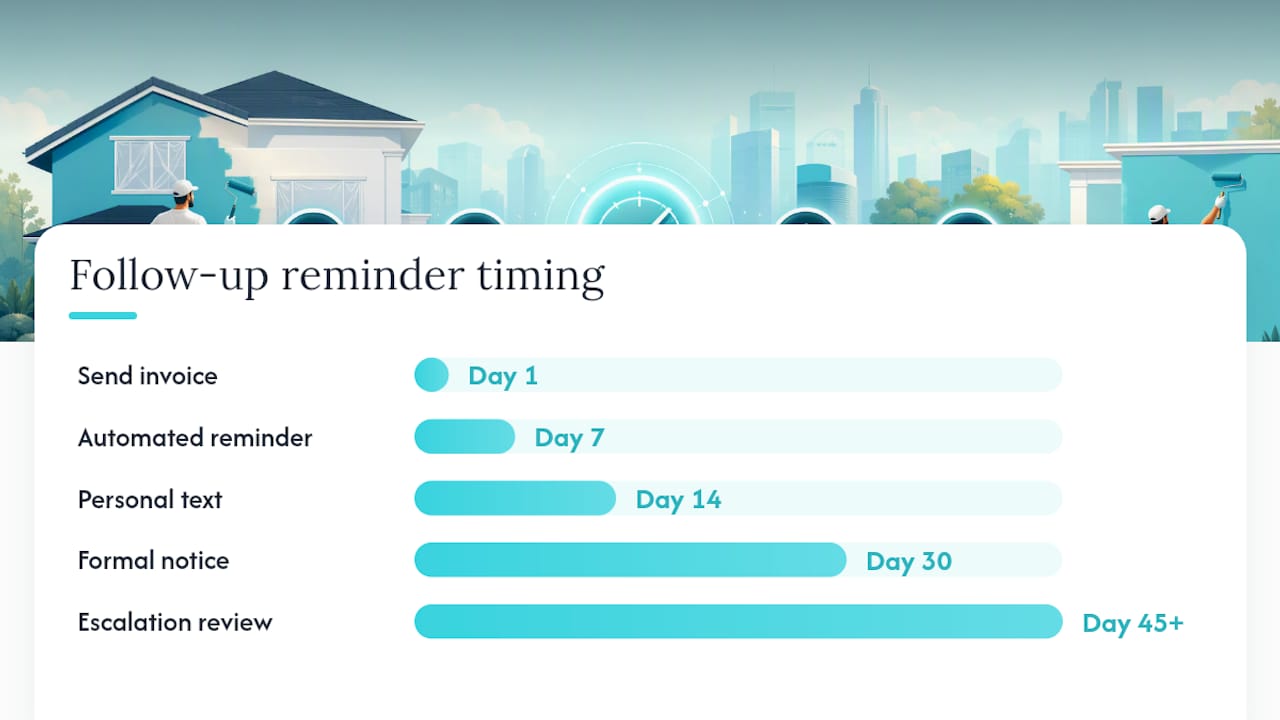
Your follow-up schedule matters almost as much as your initial send. A reasonable cadence looks like this:
- Day 1: Send the invoice with the payment link.
- Day 7: Automated reminder if unpaid (most invoicing tools can send this without you lifting a finger).
- Day 14: A short, personal text: "Hey, just checking that invoice #1042 came through okay. Let me know if you have questions."
- Day 30: A formal written notice referencing the late fee, if one applies.
- Day 45+: Consider whether the job size justifies escalating to a lien filing or a collections agency.
A step-by-step reminder setup can take this entire follow-up chain off your plate so you're not the one remembering to nag a client on day 14.
Once payment clears, log it against the invoice, issue a receipt, and reconcile it to your bank statement weekly. This is the boring part nobody talks about, but it's what keeps you from discovering in March that three invoices from November never actually got paid.
Pro Tip: Text your payment link instead of only emailing it. Clients open texts faster, and a payment link removes the "I'll mail a check" delay that stretches a five-day collection into three weeks.
When Should You Move Past Templates to Invoicing Software?
Templates work fine until they don't. A few signals tell you it's time to move on:
- You're sending more than 15 to 20 invoices a month and manual numbering is starting to slip.
- You've picked up recurring maintenance clients (property managers, rental owners) who need consistent, professional-looking invoices on a schedule.
- Progress billing on multi-day jobs is eating your evenings because you're rebuilding spreadsheets for each milestone.
- Reconciling who's paid and who hasn't now takes real effort instead of a quick glance.
Once you're there, look for a tool with a specific, minimal feature set rather than a bloated platform built for companies with fleets and dispatchers. What you actually need is: a way to convert an approved estimate straight into an invoice, mobile sending from the job site, built-in payment links for card and ACH, automated reminders, and simple reporting so you know who owes you money without digging through texts.
The workflow you're aiming for looks like this: estimate signed on-site, deposit collected, progress invoice sent at the halfway milestone if the job runs multiple days, final invoice sent same-day at completion, automated reminders running in the background, and a receipt issued the moment payment clears. That's the whole loop, and it's the same loop whether you're painting a kitchen or restaining a deck.
Some invoicing tools are built specifically for this kind of solo workflow, turning a finished job into a quote, then an invoice, without asking you to manage a dispatch board or a crew calendar you don't have. If you want to see how that estimate-to-invoice conversion works in more detail, this breakdown of the quote-to-invoice process walks through it step by step.
Who's Behind This Guide and How Quotewren Fits the Workflow
This guide draws on painter-specific invoicing practices, small-business tax and recordkeeping guidance from the IRS and SBA, and industry wage data from the Bureau of Labor Statistics, brought together into a workflow solo painters can actually run day to day.
On the brand side, here's what's factually true about Quotewren: it converts a finished job into a quote, then an invoice, and follows up with an automated review request after the client pays. It's built for solo tradespeople, not fleet-based companies, which means the feature set stays lean. Quote and invoice generation are branded to your business, payment links are built in, and the review request engine sends up to three follow-up touches by text after a job wraps, without you having to remember to ask.
What Actually Changes When You Invoice at the Walkthrough
The habit that moves the needle isn't a fancier invoice template. It's the timing. Invoicing at the walkthrough, while the client is still standing in the room looking at fresh paint, changes the psychology of the whole transaction. The job is fresh, the quality is visible, and the client hasn't had a week to find something to nitpick.
A scripted reminder matters more than a clever one. Something plain, like a quick text checking that the invoice came through, does the job better than an elaborate follow-up sequence most solo painters won't have time to maintain anyway.
One dispute worth mentioning: a client once pushed back on a repaint, claiming the trim wasn't included. The invoice line read "Trim, 2 coats semi-gloss, all rooms," dated and tied to the signed estimate. That single line ended the conversation in under a minute. Vague scope language would have turned that into a week of back-and-forth instead.
— jaras
Get Paid Faster Without Adding Software You Don't Need
Certain software gives solo painters one straightforward way to turn a finished job into a quote, then an invoice, then a paid balance, without the setup overhead of platforms built for companies running multiple trucks and crews.

If you've been living in spreadsheet templates and manually chasing payments by text, the jump to Quotewren is small: you build the quote, the client signs, the invoice generates automatically with a payment link attached, and reminders go out on their own if the balance sits unpaid. After payment clears, some tools send an automated review request, which matters more than most painters realize since a steady stream of Google reviews can make a big difference to a painter's bookings. Try it with a free trial signup and see whether it fits your workflow before committing to anything.
Where to Check Official Rules and Numbers
A few official sources are worth bookmarking for anything this guide can't fully cover for your specific state or situation:
- Bureau of Labor Statistics: painter wage data confirms national wage norms if you're setting or defending an hourly rate.
- EPA's Renovation, Repair, and Painting Program covers lead-safe prep rules for any job touching a home built before 1978.
- SBA Business Guide walks through small-business setup, banking, and recordkeeping basics.
- IRS Small Business pages explain what records and receipts you need to keep for tax reporting.
Confirm sales tax treatment with your own state's revenue department, since some states tax labor, some tax materials, and some tax both differently depending on the job type.
Sources
- Painters, construction and maintenance — Bureau of Labor Statistics
- Renovation, Repair and Painting (RRP) Program — EPA
- Small Business Administration — Business Guide
- Small businesses — IRS
- Painting invoice template: Free Excel + PDF (2026) — SimplyWise
FAQ
How do I write a painting invoice?
Start with your business info, invoice number, and dates, then list the job address, itemized scope (room, coats, paint brand and sheen), labor and materials broken out separately, tax, deposit credit, and balance due. Send it the same day you finish the walkthrough with a payment link attached.
What are the three types of invoices?
The three most common types are standard invoices (billed after work is complete), progress or milestone invoices (billed at set stages of a longer job), and recurring invoices (billed on a set schedule for ongoing maintenance clients). Painters typically use standard invoices for one-off jobs and progress invoices for multi-day repaints.
What's the best app for estimating painting costs?
The right tool depends on whether you need a standalone estimator or a full estimate-to-invoice workflow. Quotewren handles the full loop for solo painters, converting an accepted estimate directly into an invoice with a payment link, so you're not rebuilding numbers twice.
How do I invoice a client as a contractor?
Convert your signed estimate into an invoice rather than starting from a blank page, include every required field (job address, scope, materials, labor, invoice number, dates, payment terms), and send it same-day with a clear payment method attached. This is faster and more accurate than reconstructing scope details from memory after the job's done.