

An invoice payment link is a secure web address that lets a client pay you online with one tap. No login, no mailed check, no chasing cash on a job site. The fastest way to get one is a hosted invoice link straight from your invoicing tool, or a standalone payment link from a processor, sent by text right after you finish the job.
Both link types work off the same security backbone that credit card companies require, called PCI DSS. A tool like Quotewren builds the pay link right into the invoice, so you're not juggling separate apps — learn more about how Rinvii works to speed sales and payment collection with a streamlined pay-and-close process here.
- An invoice payment link is a URL, not a document. The invoice itself lists the work and the amount owed.
- Send it by text or email within an hour of finishing the job.
- A Hosted Invoice Page shows the invoice, receipt, and PDF all in one place.
Key Takeaways
Sending a mobile-friendly invoice payment link immediately after finishing a job is the single most reliable way for solo tradespeople to get paid the same day.
| Point | Details |
|---|---|
| Pick the right link type | Use a hosted invoice link for full jobs, a standalone link for deposits or fixed charges. |
| Send it fast | Text or email the link within an hour of finishing the job to catch client momentum. |
| Lock down security | Set an expiry date and use single-use links to prevent stale pricing and confusion. |
| Automate the follow-up | Turn on reminders and automatic receipts so you stop manually chasing clients. |
| Use one workflow | Quotewren combines quote, invoice, and integrated pay link so payments and reviews follow automatically. |
Where to Read More on Setup Details
- Hosted invoice pages and receipts: Stripe's Hosted Invoice Page docs
- SMS pay-by-link setup: nGenius Pay By Link via SMS
- Basic payment link functions: Zoho Invoice Payment Links guide
- Invoicing without a client account: PayPal invoicing overview
Table of Contents
- What Is an Invoice Payment Link, Exactly?
- What Are the Fastest Ways to Get an Invoice Payment Link?
- How Do You Create and Send a Hosted Invoice Link?
- How Do You Create a Standalone Payment Link for a Fixed Amount?
- What Security Settings Should You Use on a Payment Link?
- What Do Payment Links Cost, and How Fast Does the Money Arrive?
- How Do You Automate Reminders and Track Payment Status?
- What Are the Most Common Payment Link Mistakes?
- Why Do Payment Links Actually Get You Paid Faster?
- Can Clients Pay Part of an Invoice or Set Up a Payment Plan?
- Can You Customize How the Payment Link Page Looks?
- Does the Payment Link Work Well on a Phone?
- What Legal or Tax Details Should You Know About Payment Links?
- How Quotewren Fits Into Your Payment Flow
- Sources
- FAQ
What Is an Invoice Payment Link, Exactly?
A payment link and an invoice aren't the same thing, even though people use the words loosely. An invoice is the formal record: your business name, the client's name, what you did, and what they owe. The payment link is the door they walk through to pay it. Some invoicing platforms combine the two, giving you a Hosted Invoice Page where the client sees the invoice and pays it on the same screen.
That link can point to a single job, a deposit, or even a batch of unpaid invoices if your client owes you for more than one visit. A plumber who did three call-outs in one week could send one link covering all three, instead of three separate emails.
What Are the Fastest Ways to Get an Invoice Payment Link?
You've got three real options, and each one fits a different situation. Pick based on how fast you need the money and how much record-keeping you care about.
- Hosted invoice URL from your invoicing tool. Best when you want everything, the invoice, the payment, and the receipt, tracked in one system. This is the cleanest option for bookkeeping because the invoice marks itself paid automatically.
- Standalone payment link from a payment processor. Fastest when you just need to collect a fixed dollar amount and don't care about attaching it to a formal invoice. Good for a same-day charge with no back-and-forth.
- Send-by-SMS or QR code. Best for field work, when you're standing in someone's kitchen or driveway and they'd rather tap a text link than dig up an email address. Text-to-pay links load on a mobile-friendly page, so there's nothing to download.
Here's how that plays out for actual trade jobs. An electrician collecting a deposit before ordering panel parts might text a standalone link for $200. A landscaper finishing a full mulch-and-trim job sends a hosted invoice link with the full breakdown attached. An HVAC tech called out at 9 p.m. for a dead furnace can generate a QR code on the spot and let the homeowner scan it with their phone camera before the tech even leaves the driveway.
How Do You Create and Send a Hosted Invoice Link?
A hosted invoice link is the option most tradespeople should default to, because it keeps everything, the invoice, the payment, the receipt, tied together automatically. Here's the sequence:
- Create the invoice in your invoicing tool.
- Add line items and an invoice number (parts, labor, trip charge, whatever applies).
- Turn on the hosted invoice link setting.
- Add payment terms and any tax info that applies in your state.
- Send it by email, with the link included in the body or the PDF footer.
Once it's sent, the client opens a page that shows the invoice, lets them pay by card, and gives them a receipt they can download. Stripe's Hosted Invoice Page works exactly this way, showing the invoice and giving the customer a PDF without you writing a line of code.
Pro Tip: Always type the invoice number and job address into the message body, not just the link. If a client has three jobs going with you at once, a bare link with no context is how you end up on the phone explaining which invoice is which.
How Do You Create a Standalone Payment Link for a Fixed Amount?
Sometimes you don't need a full invoice, you just need the money. A standalone payment link handles that in under a minute:
- Set the dollar amount and a short description.
- Set an expiry date, or mark it single-use if your processor allows it.
- Copy the generated link.
- Add the invoice number, or attach the invoice PDF if you have one.
- Send it by email, text, or whatever messaging app your client actually checks.
This route fits a specific short list of situations:
- Collecting a deposit before you order materials.
- Charging a small, informal job with no formal invoice needed.
- Accepting a tip or add-on charge after the main job is billed.
If you're sending by text or QR code, keep the message short: job reference, dollar amount, and an expiry date. Wise's payment request tool lets you attach a memo and due date to the link itself, which cuts down on confused follow-up texts.
What Security Settings Should You Use on a Payment Link?
A few small settings do most of the heavy lifting here. Set an expiry date on every link you send. This isn't just a security measure, it also stops a client from paying an old price if you've since adjusted the job scope. A link that never expires is a link someone might use months later at a rate you no longer charge.
- Use single-use links for invoice-specific requests so the same link can't be reused by mistake.
- Send through a hosted, PCI-compliant checkout page so card numbers never pass through your phone or email.
- Always include an invoice number and description, and turn on automatic receipts.
Setting an expiration date doubles as a built-in follow-up reminder: when a link expires unpaid, that's your cue to check in with the client instead of wondering if they forgot.
What Do Payment Links Cost, and How Fast Does the Money Arrive?
Card fees are the real cost here, usually a small percentage of the charge plus a flat per-transaction fee. Exact rates vary by processor, so check your provider's pricing page before you commit to one.
- Payouts typically land in your bank account same-day to a few business days later, depending on the processor and your bank.
- Setup takes minutes once your account is verified, not days.
- Recurring invoices or batch payment links usually process on the same payout schedule as one-off charges.
Budget for the fee when you quote a job, especially on tight-margin work like small handyman repairs where a few percentage points actually matter.
How Do You Automate Reminders and Track Payment Status?
Chasing payments by phone is the least productive part of running a trade business, and it's the part automation handles best.
- Turn on automatic payment reminders so the system nudges the client, not you.
- Enable automatic receipts so the client gets confirmation the second they pay.
- Use your platform's status dashboard or email notifications to see when a link was opened and when it was paid.
- Where your tool supports it, let paid invoices mark themselves paid automatically instead of updating your books by hand.
That last point matters more than it sounds. Manually marking invoices paid is where errors creep into your books, especially when you're doing five jobs a week solo.
What Are the Most Common Payment Link Mistakes?
A few small slip-ups cause most payment delays and disputes, and all of them have a one-line fix.
- Mistake: Sending a bare link with no invoice number. Fix: Attach the invoice or reference it directly in the text.
- Mistake: Forgetting to set an expiry. Fix: Set one, and just resend a fresh link if the client needs more time.
- Mistake: Writing a paragraph of instructions. Fix: Send the amount, invoice number, and due date in one short line.
Why Do Payment Links Actually Get You Paid Faster?
Friction kills payments. Every extra step, creating an account, finding a checkbook, waiting for a callback, gives a client a reason to put it off. A direct, mobile-friendly link that opens and pays in two taps removes nearly all of that friction, which is why same-day payment rates climb when tradespeople switch from mailed invoices to links.
Copy this checklist into your phone notes and run it after every job:
- Include the invoice number.
- Set an expiry date.
- Use SMS for field clients, email for office-based ones.
- Turn on receipts and automatic reconciliation.
Quotewren builds this sequence into one flow: quote, invoice, and integrated pay link, so you're not stitching together three separate tools between jobs.
Can Clients Pay Part of an Invoice or Set Up a Payment Plan?
Big jobs, a full bathroom remodel, a new HVAC system, often need more than one payment. Most payment link systems handle this in one of two ways.
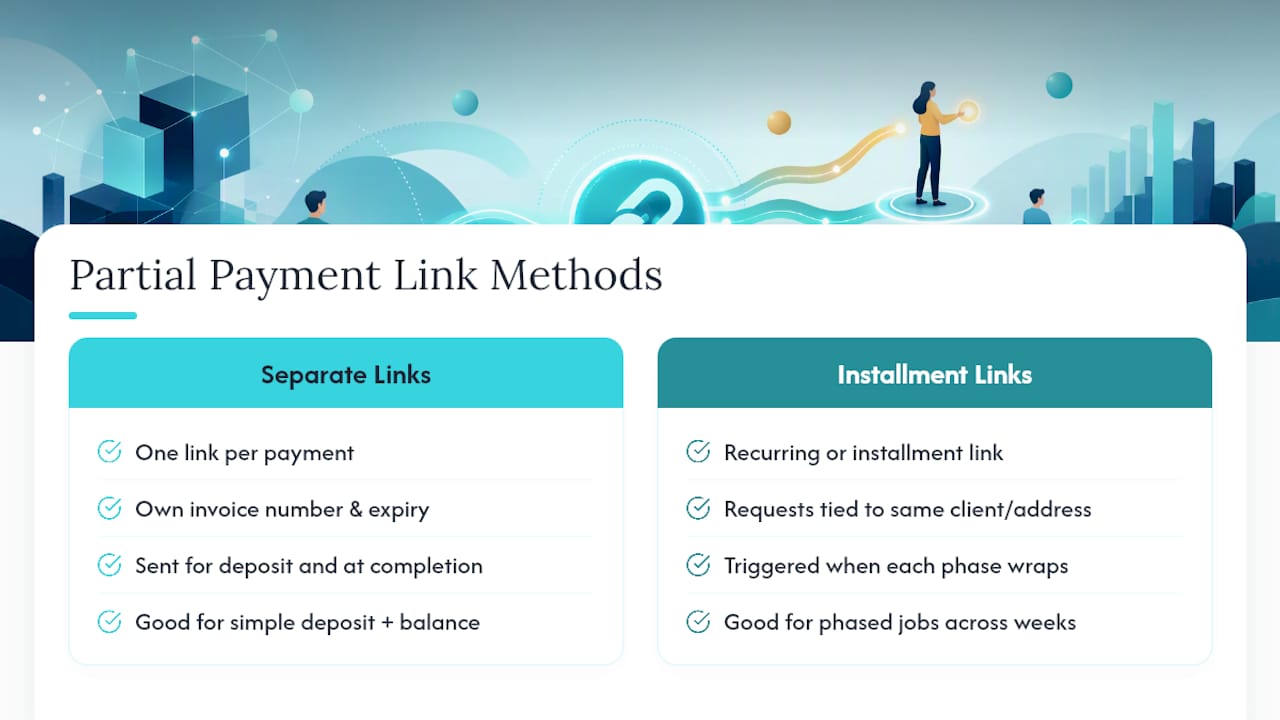
The simplest is splitting the total into separate links: one for the deposit, one for the balance due at completion. Each link gets its own invoice number and its own expiry, so there's no confusion about which payment covers what.
The second method is a recurring or installment link, useful for larger jobs spread across weeks. A kitchen remodel billed in three phases, demo, rough-in, and finish work, can use three separate payment requests tied to the same client and job address, each triggered when that phase wraps.
Whichever method you use, never send a partial-payment link without stating clearly what portion of the total it covers. "Deposit for kitchen remodel, $1,500 of $6,000 total" tells the client exactly where they stand. Leaving that off is how disputes start three weeks later when nobody remembers what was already paid.
If a client falls behind mid-project, resending a fresh link with an updated amount is cleaner than trying to edit an old one. A stale link with the wrong balance creates more confusion than it solves.
Can You Customize How the Payment Link Page Looks?
Most invoicing and payment tools let you add your business name, logo, and a short message to the hosted checkout page. This isn't just cosmetic. A branded page with your business name on it reassures a client that the link is legitimate and not a phishing attempt, which matters more than ever now that scam texts are common.
Keep the message on the page short and specific: what the charge is for, the invoice number, and maybe a one-line thank you. Skip anything that reads like marketing copy. A client trying to pay a $340 plumbing invoice doesn't want to scroll past three paragraphs of your company history to find the pay button.
If your platform lets you customize the confirmation message after payment, use it to set expectations. Something like "Thanks. Your receipt is on its way to your email" answers the question every client has the second they hit submit.
Does the Payment Link Work Well on a Phone?
It has to. Most clients pay from their phone, standing in their driveway or sitting on their couch, not from a desktop. A payment link that isn't built for mobile is the single biggest reason a client abandons a payment halfway through.

Good mobile design means large tap targets, autofill for card numbers, and a page that loads in a couple of seconds on average cell service. Guest checkout matters here too. Forcing a client to create an account before they can pay a $150 invoice is asking them to do homework for the privilege of giving you money, and a lot of them just won't bother. PayPal's invoicing setup lets customers pay without ever creating an account, which is the standard the rest of the industry has followed.
If you're sending links by SMS, test one on your own phone first. Make sure it opens directly to the payment page instead of a login screen or a slow-loading redirect.
What Legal or Tax Details Should You Know About Payment Links?
A payment link doesn't change what you owe in taxes, it just changes how the money arrives. Whatever your state requires for sales tax on labor or materials still applies, whether the client pays by check or by tapping a link. Track that tax the same way you would on a paper invoice.
Keep records. Every processor gives you a transaction history, and that history is your proof of payment if a client disputes a charge or if you get audited. Download and store receipts rather than relying on the platform to keep them forever.
One more detail worth checking: card processing fees are a real business expense, and how you record them (as a deduction, or passed through to the client) depends on your bookkeeping setup and your state's rules on surcharging customers for card fees. Some states restrict adding a surcharge for card payments, so check your state's specific rule before adding one to your invoices.
A Short Note From the Field
Send the link before you leave the driveway, not after dinner. Momentum fades fast once you're gone, and same-day requests get paid same-day far more often than next-week reminders do.
How Quotewren Fits Into Your Payment Flow
Quotewren keeps quoting, invoicing, and getting paid in one place, so you're not bouncing between a quoting app, a separate invoicing tool, and a third app just for payment links.

You build the quote, it converts to an invoice with the pay link already attached, and once the client pays, Quotewren's review-request engine follows up automatically to ask for a Google review. That's the part most solo tradespeople skip entirely because they're too busy running to the next job. A landscaper who used to mail invoices and hope for reviews now sends one link that handles the payment and sets up the review ask without another step. If you want to see how the quote-to-invoice-to-paid flow works for your trade, try Quotewren and start a free trial to send your next invoice with a pay link built in.
Sources
- Zoho Invoice — Payment Links basic functions
- Text to Pay: Here’s How it Works | Stripe
- Stripe — Hosted Invoice Page
- PayPal — Create and send invoices
FAQ
How Do You Make a Payment Link for an Invoice?
Create the invoice in your invoicing tool, turn on the hosted invoice link setting, and send it by email or text. Most platforms, including Quotewren, generate the link automatically once the invoice is saved.
Is Link a Legit Payment Method?
Payment links from established processors like Stripe and PayPal are legitimate and use the same PCI-compliant security as standard card processing. The risk comes from unverified links sent by unknown senders, not from the link format itself.
What's the Difference Between an Invoice and a Payment Link?
An invoice is the document listing the work and amount owed. A payment link is the secure URL a client clicks to actually pay that invoice online, and the two are often combined on a single hosted page.
Can You Generate a Payment Link Yourself?
Yes. Any invoicing tool or payment processor with pay-by-link features lets you generate a link in minutes, no developer or account manager required. Set the amount, add a description and expiry, and send it directly to your client.
How Fast Does Money From a Payment Link Reach Your Bank?
Payout speed depends on your processor and bank, ranging from the same day to a few business days after the client pays.