

Use SMS review requests as your main channel once you have a customer's consent. Texts get opened in minutes, not days, so your review link gets clicked while the job is still fresh in the customer's mind. Keep the message under 160 characters, use the customer's first name and your business name, drop in a direct review link, and send it close to job completion. If nobody responds, send one polite reminder two to three days later, then let it go.
TL;DR:
- Sending review requests via SMS within a few hours after completing a job significantly increases response rates compared to email, especially for local and mobile-first services.
- Texts should be short, personalized with the customer's first name and your business name, and include a direct link to the Google review form for maximum effectiveness.
- Sending one reminder two to three days later can boost reviews by up to 50%, but more than one follow-up risks alienating customers or prompting opt-outs.
- Automating review requests through tools like Quotewren ensures consistent follow-up without manual effort, handling opt-outs and timing to maintain trust.
- Tracking review response rate and link click-through data helps refine timing and message content for better performance over time.
Table of Contents
- Why SMS Beats Email for Review Requests
- What Makes a Review Text Actually Work
- When to Send and How Many Times to Ask
- Copy-and-Send SMS Templates for Trades
- Setting Up Automated Review Requests Without Breaking Trust
- Tracking What's Working: Metrics That Matter
- What Solo Tradespeople Actually Need From This
- A Simple Way to Put This Playbook on Autopilot
- Sources
- FAQ
Why SMS Beats Email for Review Requests
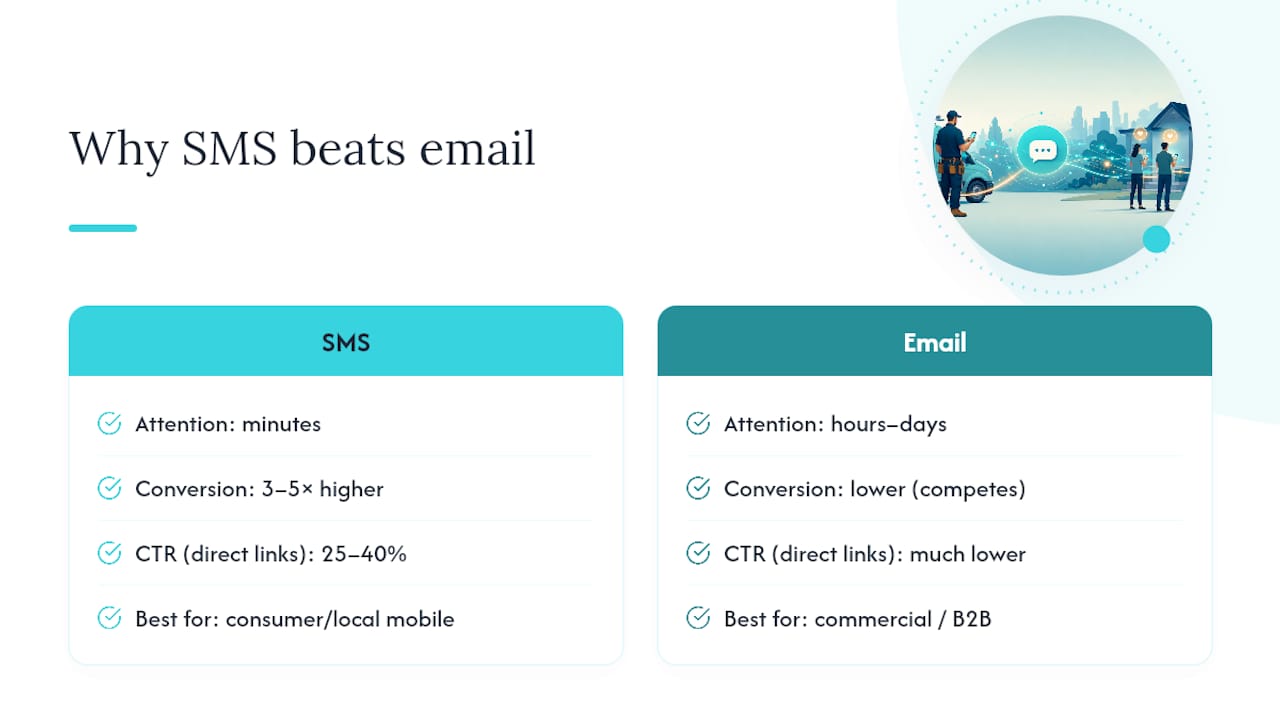
Most people check a text within minutes of getting it. Email sits in an inbox for hours, sometimes days, buried under junk and promos. That gap in attention is the whole reason SMS review requests convert at roughly 3 to 5 times the rate of email, with click-through rates on direct review links running about 25 to 40%.
Quick stat: A text sent right after a job finishes catches the customer while the memory is still warm. Wait a week and email that same request, and you're competing with grocery coupons and newsletter blasts for attention.
SMS works best for consumer-facing, mobile-first, local services. Think plumbers, electricians, HVAC techs, cleaners, landscapers, handymen. Your customer is standing in their kitchen or driveway with their phone in hand right after you leave. That's the moment to strike.
Email still has its place. If you do commercial or B2B work, like servicing office buildings or working under a property management contract, email might fit better because the decision maker isn't the person standing next to you at the end of the job. And if you never collected a phone number, don't send a text guessing at one. No consent, no text.
Timing also depends on the job. A plumber who unclogs a drain in twenty minutes can text that same afternoon. An HVAC tech who installs a new system might wait 24 to 48 hours, since the customer wants to see the unit actually work through a full heating or cooling cycle before they feel good about leaving a review.
What Makes a Review Text Actually Work
The best SMS review requests follow a tight formula. Skip the formula and you get ignored, or worse, marked as spam.
- Length: aim for one text segment, around 160 characters. Shorter reads as more personal, and it's less likely to get cut off on older phones.
- First name: "Hi Mike" beats "Dear Customer" every time.
- Business name: the customer needs to remember who's texting, especially if you're not saved in their contacts.
- Direct review link: send them straight to the Google review form, not your homepage or a general Google Business Profile page. High-converting templates always pair a short message with a direct link, never a maze of clicks.
- One clear ask: don't ask for a review and try to upsell a maintenance plan in the same text. Pick one job for the message.
- Opt-out line: include a short "Reply STOP to opt out" so customers know they're in control.
What to leave out matters just as much. Never offer a discount or gift card in exchange for a review. Never screen customers first and only text the ones you think are happy. Both practices violate Google's review policies and can get reviews filtered or your account flagged.
Here's the difference between weak and strong phrasing:
Weak: "Hey! We hope you enjoyed our service! If you have a moment, we'd love it if you could maybe leave us a review sometime, no pressure!"
Strong: "Hi Sarah, this is Dave from Dave's Plumbing. Thanks for choosing us today. Mind leaving a quick Google review? [link] Reply STOP to opt out."
Pro Tip: Read your draft text out loud before you send it to your first customer. If it sounds like a form letter, it will read like one on their phone too.
When to Send and How Many Times to Ask
Timing makes or breaks your review rate. Send too early and the job isn't finished in the customer's mind. Send too late and they've already forgotten the details.
- Quick jobs (drain clearing, thermostat swap, small electrical repair): send the text 1 to 2 hours after you leave.
- Visible-result jobs (water heater install, panel upgrade, AC repair): wait 24 to 48 hours so the customer sees it actually work.
- Long-arc jobs (full HVAC system, kitchen remodel, landscape overhaul): wait 5 to 7 days so the result has time to settle in.
Stick to local business hours. Never text before 8 AM or after 8 PM, and Tuesday through Thursday mornings tend to get better response rates than Monday chaos or Friday afternoon distraction.
If the customer doesn't respond, send one polite reminder 2 to 3 days later. A single follow-up reminder typically accounts for 30 to 50% of the incremental reviews a small business collects, so skipping it leaves real reviews on the table. After that one reminder, stop. Texting a customer a third time about a review starts to feel like nagging, and it can push them to opt out of everything, including appointment reminders.
Copy-and-Send SMS Templates for Trades
Here are templates you can adapt today. Swap in your name, business, and link, and you're ready to send.
- Universal direct ask: "Hi [First Name], this is [Your Name] with [Business Name]. Thanks for trusting us with your [job type]. Could you leave a quick Google review? [link]"
- Specific service: "Hi [First Name], [Your Name] here from [Business Name]. Glad we got that water heater fixed today. If you have 30 seconds, a review would mean a lot: [link]"
- Owner-signed: "Hi [First Name], it's [Your Name], owner of [Business Name]. I personally read every review. Would you share yours here? [link]"
- Team shoutout: "Hi [First Name], thanks for having [Tech Name] out for your [service] today. A Google review helps our small crew a lot: [link]"
- Recovery (after a hiccup got resolved): "Hi [First Name], thanks for your patience while we sorted that out. If you're happy with how it landed, a review would help us: [link]"
- Casual friendly: "Hey [First Name], [Your Name] from [Business Name] here. Hope the new outlets are working great. Mind dropping a quick review? [link]"
- Repeat customer: "Hi [First Name], always good working with you again. If you've got a minute, a fresh review helps other folks find us: [link]"
For the follow-up reminder, keep it even shorter: "Hi [First Name], just following up. If you have 30 seconds, we'd really appreciate a review: [link]. Thanks again!"
Before rolling any template out to your whole customer list, test the link on your own phone first. A link that opens your business profile but not the actual review form is a common failure that kills conversion without you ever knowing why. Getting your Google review link working correctly before you send a single text saves you from wasting an entire batch of requests.
Personalize with real tokens, not placeholders left in by accident. Nothing kills trust faster than a text that says "Hi [First Name]" because someone forgot to swap the field.
Setting Up Automated Review Requests Without Breaking Trust
You know it's time to automate when you're doing more than a handful of jobs a week and you keep forgetting to send review texts, or you send them at random times with no consistency. Manual sending works fine at low volume. Past that, jobs slip through the cracks.
Automation has to handle a few things correctly, or it does more harm than good:
- Opt-out handling: every automated system needs to catch "STOP" replies and never text that number again.
- Quiet hours: the system should never fire a text before 8 AM or after 8 PM in the customer's own time zone, not yours.
- Logging: keep a record of who got texted and when, in case a customer disputes getting a message or asks to be removed.
- Ask everyone: automation should text every completed job, not just the ones you suspect went well. Consistent, automatic sending is what prevents accidental review-gating, where a business unconsciously only asks happy customers and skips the rest.
Wire the trigger to fire right after you mark an invoice paid or a quote completed, not on some separate schedule you have to remember. Test the whole flow yourself once, from job completion to text delivery to the review form loading correctly on your own phone, before trusting it with real customers.
Pro Tip: If you're texting customers about appointments too, keep those message flows separate from review requests. Mixing "your tech is 15 minutes away" with "please review us" in the same thread confuses people and can hurt both messages. For general best practices on service-business texting and quiet hours, this SMS reminder guide is worth a look.
Tracking What's Working: Metrics That Matter
The number that matters most is the percentage of customers who actually post a review within 14 days of getting your text. Anything lower and something in your message, timing, or link is broken.
Secondary numbers worth tracking: link tap rate, which should sit around 25 to 40% based on industry benchmarks, delivery rate, opt-out rate, and how much lift your one follow-up reminder adds on top of the first text.
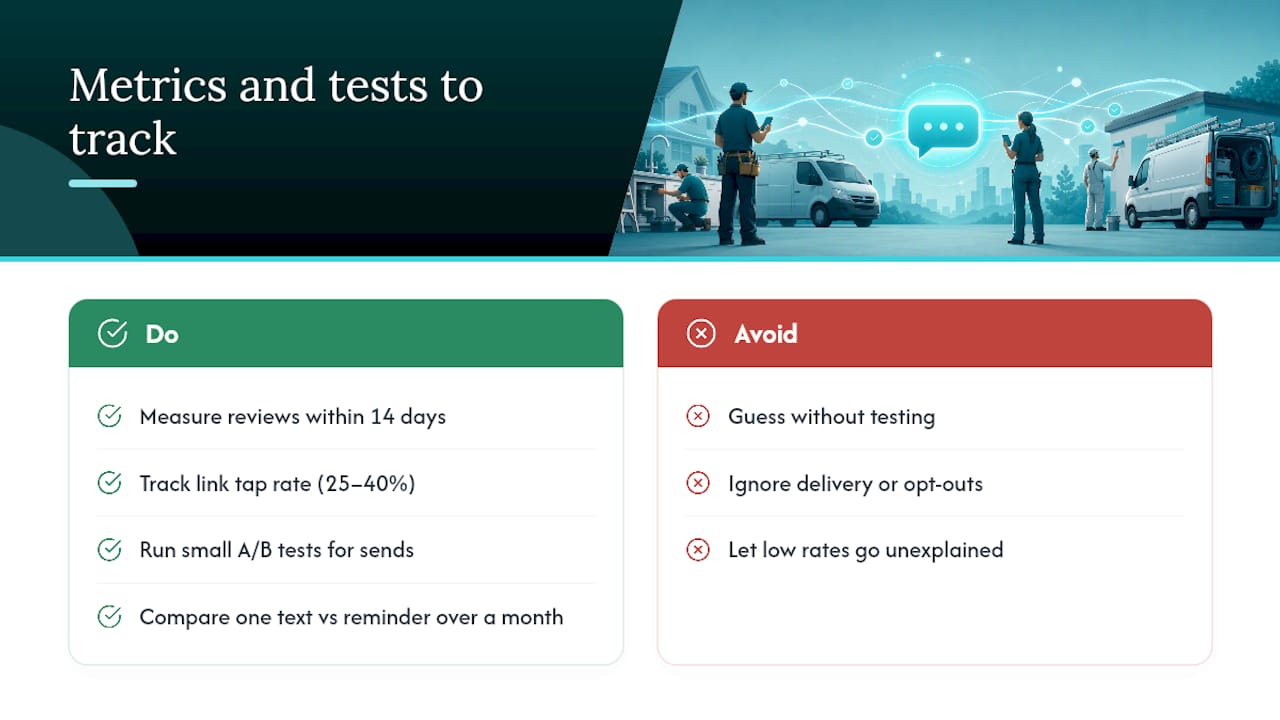
Run small tests instead of guessing. Try shifting your send window by a few hours. Try an owner-signed message against a generic team message. Try sending just one text versus one text plus a reminder, and compare the results over a month of real jobs.
What Solo Tradespeople Actually Need From This
Most review-request advice assumes you have a marketing team or hours to spare. You don't. You're finishing a job, driving to the next one, and hoping you remember to ask for a review before the memory fades. Some review request tools build the SMS request into the same flow as your quote and invoice, so the ask can go out automatically once the job and payment are done, without needing manual texting.
— jaras
A Simple Way to Put This Playbook on Autopilot
There are tools that give solo tradespeople a straight line from finished job to paid invoice to review request, without extra software subscriptions or a steep learning curve. Instead of juggling separate apps for quoting, invoicing, and chasing reviews, one flow handles all three, and the SMS review request can go out automatically after the job is marked complete.
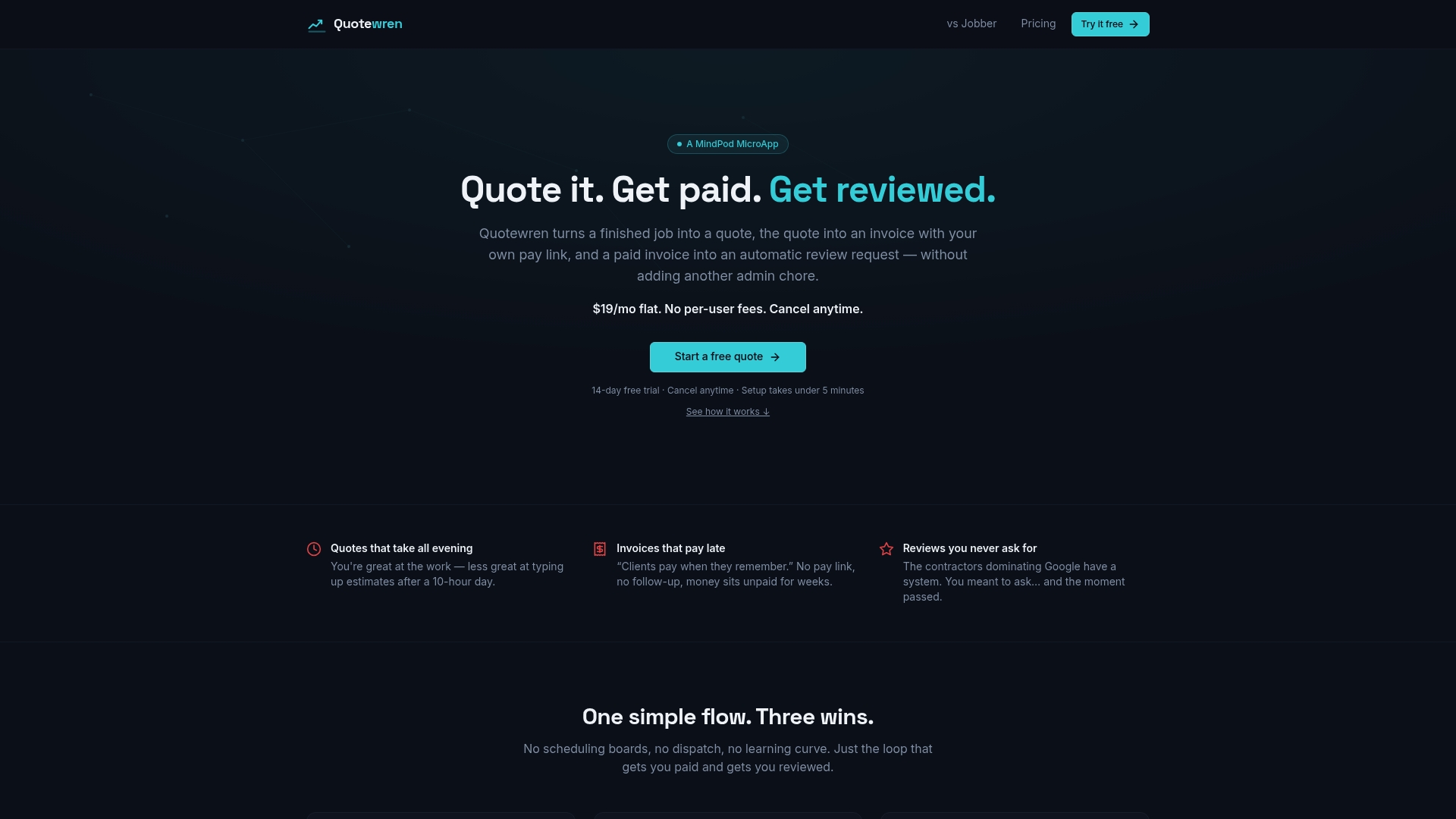
That automation matters because the biggest reason solo operators miss reviews isn't a bad template. It's forgetting to send anything at all once the truck is loaded and you're headed to the next job. Some systems use a three-touch SMS engine that sends the initial ask, then follows up once if there's no response, following opt-out and timing best practices. Pair that steady flow of reviews with a look at how to get more Google reviews without chasing customers down for the bigger reputation picture. If you'd rather see it work on your own jobs than read about it, start with Quotewren and send your first automated review request this week.
FAQ
What Is an Example of a Good Review Request Message?
A strong example reads: "Hi Mike, this is Dave from Dave's Plumbing. Thanks for choosing us today. Mind leaving a quick Google review? [link] Reply STOP to opt out." It's short, uses the customer's name, names the business, and links straight to the review form.
What Counts as a Review Request?
A review request is a short, direct message asking a customer to share their experience on a public platform like Google, sent after a completed job or service, usually with a link that takes them straight to the review form.
What's a Good Message to Ask for a Review Without Sounding Desperate?
Keep it brief, personal, and low-pressure: name the customer, name your business, state one clear ask, and stop there. Adding extra apologetic language like "no pressure" or "if it's not too much trouble" often reads as more nervous, not less.
Does Quotewren Handle SMS Review Requests Automatically?
Yes. Quotewren's three-touch SMS engine sends a review request after a job is marked complete and follows up once if the customer hasn't responded, following the same timing and opt-out practices covered in this guide.