

Yes, reply to every review, good or bad. Keep it short, name the specific issue, move any real fix to a phone call or private message, and sign off with your real name. Do it within a day or two of the review posting, before the customer forgets the job and before a new lead reads it first.
TL;DR:
- Responding to negative reviews first minimizes long-term reputational damage, especially if the issue is clearly identified and addressed quickly.
- Most replies are made on Google using the profile dashboard and should be signed with a real name and a professional tone, avoiding sharing sensitive customer details.
- Using the L.A.S.T. framework—Listen, Apologize, Solve, Thank—ensures responses are structured and effective, regardless of the star rating.
- Automating review requests after jobs are completed keeps the review stream steady, reducing the need for daily manual follow-up.
- Tracking response rates and review updates helps refine reply tactics and demonstrates progress in building trust and improving ratings.
Table of Contents
- Why Responding to Reviews Matters More Than You Think
- Where Do You Actually Reply to a Review?
- The L.A.S.T. Framework: A Reply Structure That Works Every Time
- Templates You Can Copy, Paste, and Personalize
- How to Keep Up With Reviews Without It Eating Your Day
- What I've Learned Watching Tradespeople Handle This
- How Quotewren Takes the Review Chase Off Your Plate
- Where to Learn More About Review Rules and Frameworks
- Sources
- FAQ
Why Responding to Reviews Matters More Than You Think
A reply is not just for the person who wrote the review. It is for the many people who read it before they call you.
When someone searches "plumber near me" and lands on your Google Business Profile, they are not just scanning stars. They are reading how you handle problems. A four-star review with no reply looks abandoned. That same review with a two-sentence, polite response from the owner looks like a business that pays attention. Consumers consistently say they trust businesses that respond to reviews more than ones that stay silent, and industry guides on responding to reviews show that timely, professional replies can reduce reputational damage and sometimes nudge average ratings up over time.
Here's the part most solo tradespeople miss: your reply shows up on Google search and Maps forever, right under the star rating. It's free advertising space, and most contractors leave it blank.
If you're catching up on a backlog of reviews, don't try to answer them in the order they came in. Work this way instead:
- Negative reviews first. These do the most damage the longest they sit unanswered.
- Neutral or three-star reviews second. These are often fixable relationships you can still save.
- Positive reviews last, but don't skip them. A quick thank-you costs you thirty seconds and keeps happy customers feeling good about referring you.
Pro Tip: If you only have ten minutes a day for reviews, spend eight of them on the one bad review and two on thanking your good ones. The bad one is doing more damage per minute it sits there.
Survey data on consumer expectations backs this up: shoppers routinely say they expect a reply and see it as a sign of a well-run business, according to research summarized by 1upreview. Skipping replies isn't neutral. It's a missed chance to close the next job.
Where Do You Actually Reply to a Review?
Most of your replies will happen on Google, since that's where homeowners search for tradespeople. Here's the exact path.
- Open Google Business Profile (either the app or google.com/business) and sign in with the account tied to your listing.
- Tap "Reviews" from the menu. You'll see a list of every review left on your profile, newest first.
- Find the review you want to answer and tap "Reply."
- Type your response and hit "Post" (or "Submit," depending on the version).
Only the business owner or someone you've added as a manager on the profile can post a reply, and once it's up, it publishes under your business name, not your personal name. You can edit or delete your own reply later if you catch a typo or need to update it, but you can never edit or delete the customer's original review, according to Google's own Business Profile help documentation. Plan what you write before you hit post.
Replies typically show up fast, often within minutes, but Google reserves the right to review content before it goes public, and in some cases that check takes longer, per the same Google Business Profile guidance. Don't panic if your reply doesn't appear instantly.
If you also get reviews on Yelp or Facebook, the process is similar: find the review, click reply, keep it professional. One safety note across every platform: never post a customer's phone number, address, or job details in a public reply, even to defend yourself. Ask them to call or text you directly instead.
The L.A.S.T. Framework: A Reply Structure That Works Every Time
You don't need to write a new response from scratch every time. Use L.A.S.T., a four-step structure built for exactly this: Listen, Apologize, Solve, Thank. It's a repeatable method documented across review-response guides, and it works whether you're an electrician, a landscaper, or a house cleaner.
Here's how each step looks in practice:
- Listen: Repeat back the specific issue so the reviewer knows you actually read it. "You mentioned the AC unit was still blowing warm air after the visit."
- Apologize: Say sorry for the experience, not for something that admits fault you haven't confirmed. "We're sorry that wasn't resolved on the first visit."
- Solve: Offer a concrete next step with a timeframe. "Please call us at [number] and we'll get someone back out this week at no charge."
- Thank: Close with genuine appreciation. "Thanks for letting us know. We want to make this right."
That structure scales well precisely because it's short and it forces you to move the real conversation off the public page, which keeps you from negotiating refunds or arguing in front of every future customer, an approach reinforced in Reviewz's breakdown of the framework.
Tone and length should shift depending on the star rating. A five-star review deserves one to two warm sentences. Nobody wants to read a paragraph thanking them for a good experience; it starts to feel fake. A negative review deserves three to five sentences: enough room to acknowledge the issue, apologize, and offer a fix, but not so much that you sound defensive or start over-explaining.
One tricky spot: how do you apologize without admitting legal fault, especially for jobs involving water damage, electrical work, or anything that could turn into a liability claim? Apologize for the experience, not the cause. "We're sorry the leak wasn't fully stopped" is safe. "We're sorry we damaged your ceiling" is an admission you don't want sitting in a public review thread. When in doubt, keep the apology about their frustration and inconvenience, and save the specifics for the phone call.
Only offer a firm timeline when you can actually keep it. "We'll call you within 24 hours" only works if someone actually picks up the phone within 24 hours. A vague promise you don't keep does more damage than the original bad review.
Templates You Can Copy, Paste, and Personalize
These are starting points, not scripts to use word for word. Swap in the customer's first name, the specific service, and your own name every time. Generic copy-paste replies are easy to spot and they undo the trust you're trying to build.
Positive review replies (5 stars):
- "Thanks, Maria! Glad we could get that water heater swapped out same-day. We appreciate you taking the time to write this."
- "Appreciate the kind words, Dave. Replacing that breaker panel was a big job, and it was great working with you."
- "Thank you for the review! Keeping your lawn looking sharp all season is exactly what we aim for."
- "Really glad the AC is running cold again, Janet. Thanks for trusting us with the repair."
Personalize each one with the specific job and, when it fits, a small detail only that customer would recognize. It signals you're not running the same three lines on every review.
Neutral or 3-star replies (turn feedback into a fix):
- "Thanks for the honest feedback, Tom. Sounds like our arrival window ran later than we promised. We're tightening up scheduling and would love the chance to make the next visit smoother."
- "We appreciate you flagging the cleanup, Sarah. That's on us, and we've talked to the crew about leaving job sites spotless. Hope we can show you the difference next time."
- "Thank you for the review. It sounds like pricing wasn't as clear upfront as it should've been. We're happy to walk through the estimate again anytime."
Negative reply templates (using L.A.S.T.):
- Late appointment (plumbing): "We're sorry we missed the window we gave you. That's a scheduling failure on our end. Please call us at [number] and we'll prioritize your next appointment. Thanks for your patience."
- Messy job site (electrical): "You're right that the site should've been left cleaner. We apologize for the inconvenience. Give us a call and we'll send someone back to finish the cleanup this week. Thank you for telling us."
- No-show (HVAC): "We're sorry we didn't show up as scheduled. That's not how we operate and we understand the frustration. Please reach out at [number] so we can get you rescheduled first thing and make this right."
- Incomplete repair (handyman): "Sorry to hear the fix didn't hold. We'd like to take another look at no charge. Please call or text [number] so we can get this resolved for you."
- Pricing dispute (landscaping): "We understand the final cost was a surprise. We'd like to walk through the estimate with you directly. Please call [number] so we can sort this out."
- Damage claim (cleaning): "We're sorry to hear about the damage and understand the concern. We'd like to discuss this directly. Please contact us at [number] so we can look into it properly."
Fake or unfair reviews: Reply publicly and briefly, something like: "We don't have a record of service at this address. Please contact us directly so we can look into this." Then flag the review through the platform's reporting tool with any evidence you have, like job records or scheduling logs. Responding publicly and flagging privately are two separate, parallel steps, and Google's own guidance supports using both rather than relying on one alone.
How to Keep Up With Reviews Without It Eating Your Day
You don't need an hour a day for this. You need ten to twenty minutes and a system.

Start by turning on push or email notifications inside your Google Business Profile app, so a new review lands in front of you the same day it's posted. Set one fixed check window, say, every morning with coffee or every evening after the last job, so review replies don't get lost between quotes and site visits.
Build a small library of six to eight go-to templates, covering your most common scenarios: late arrival, no-show, price question, mess left behind, incomplete fix, and general thank-you. Then apply three personalization rules to every single one before you post it: use the customer's actual name, mention the specific job or service, and include a real contact method, not just "call us."
Not every reply needs the owner's personal signature. Routine five-star thank-yous can come from whoever's handling reviews that day. But for anything involving a complaint, a big-ticket job, or a customer who seems genuinely upset, sign it yourself, first name and title. A founder-signed reply on a high-value job signals accountability, and it noticeably increases the odds a customer updates their review after you fix things offline, based on patterns documented in review-response research.
Track two numbers, nothing fancier: your response rate (how many reviews you actually replied to) and your changed-review count (how many negative reviews got updated to a better rating after you resolved things). Those two metrics tell you whether your system is working.
| What to Track | Why It Matters | How Often to Check |
|---|---|---|
| Response rate | Shows if replies are falling through the cracks | Weekly |
| Changed-review count | Confirms your fixes are actually landing | Monthly |
| Time-to-reply | Keeps you inside the 24 to 48 hour window that builds trust | Weekly |
One more thing worth automating: the request that gets the review in the first place. A tool that sends a review request automatically right after a job is marked done removes the awkward "hey, can you leave us a review" text you have to remember to send yourself.
What I've Learned Watching Tradespeople Handle This
The best reply I ever saw wasn't fancy. An HVAC tech had a customer leave two stars because his crew ran four hours late. He wrote three sentences: named the delay, apologized, gave a direct number to call. That's it. No excuses, no defensiveness. The customer updated the review to four stars two days later.
Print this checklist or screenshot it:
- Reply within 24 to 48 hours.
- Name the specific issue mentioned.
- Offer a real contact method (phone or text).
- Sign with your actual name and role.
- Give a private fix timeline you can actually keep.
- Follow up once the fix is done.
- Log the outcome so you know what worked.
Pro Tip: For any job over your average ticket size, sign the reply yourself instead of letting a generic business name post it. Customers remember when the owner personally responded.
— jaras
How Quotewren Takes the Review Chase Off Your Plate
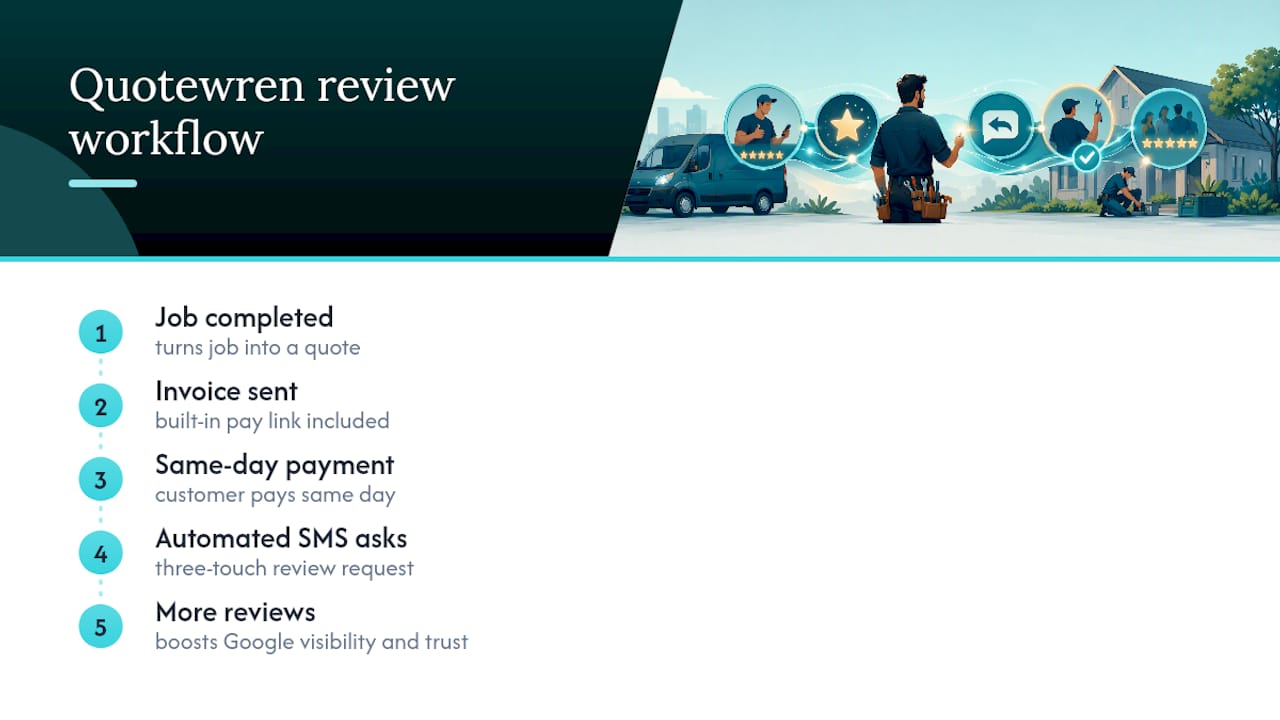
Replying to reviews only works if you're actually getting them, and that's the part most solo tradespeople let slide once the invoice gets paid. Quotewren is built for exactly that gap: it turns a finished job into a quote, then an invoice, then an automated review request, all without you having to remember to send anything.

Here's how it plays out on a real job. Say you finish replacing a water heater on a Tuesday afternoon. You send the invoice through Quotewren with a built-in pay link, the customer pays same-day, and Quotewren fires off a three-touch SMS review request over the following days so the ask lands while the job is still fresh in their mind. No sticky note on your dashboard reminding you to text them later.
That steady stream of new reviews is exactly what fuels everything covered above: more reviews to reply to, more visibility on Google, more trust before a stranger even calls you. If you're tired of chasing payments and chasing reviews as two separate jobs, try Quotewren and see what it looks like to have both run themselves.
Where to Learn More About Review Rules and Frameworks
For platform-specific rules, Google's Business Profile help center confirms who can post replies and how moderation timing works. For a deeper look at the L.A.S.T. framework and real reply examples, Reviewz's guide is worth bookmarking. If you want to build a bigger pipeline of reviews in the first place, aceSites' guide to getting more customer reviews covers collection tactics that pair well with the reply habits in this article.
Sources
- Manage and respond to reviews - Google Business Profile Help
- How to respond to negative reviews: the L.A.S.T. framework + 7 real examples · Reviewz
- 1upreview
- Responding to Negative Reviews: Real Examples + Best Practice Templates - Thryv
FAQ
How Do I Reply to a Good Review?
Thank the customer by name, mention the specific job you did, and keep it to one or two sentences. Something like "Thanks, Maria! Glad we could get that water heater fixed same-day" hits the mark without sounding rehearsed.
What Are Some Good Positive Review Response Examples?
Short and specific works best: reference the actual service, use the customer's first name, and skip generic phrases like "we value your business." A line like "Appreciate the kind words, Dave. That breaker panel replacement was a big job" feels genuine because it's specific.
How Do You Say Thank You for a Review?
Say it plainly and briefly. "Thank you for taking the time to leave this review" or "We appreciate you sharing your experience" both work fine as an opener before you add a specific detail about the job.
What Is the Best Way to Reply to Negative Comments?
Use the L.A.S.T. framework: listen to the specific complaint, apologize for the experience, offer a concrete private fix with a timeline, and thank them for the feedback, all in three to five sentences without arguing publicly.
How Fast Should I Respond to a Review?
Aim for within 24 to 48 hours. Faster replies show customers you're paying attention, and negative reviews left unanswered longer than that tend to do more visible damage to how new customers perceive your business.