
You can't delete a platform review yourself, but you can get rid of it the right way. Flag the review using the platform's official report tool and pick the correct policy reason, screenshot everything before it disappears, post a short calm public reply, and escalate through an appeal or an FTC complaint if the first flag gets denied. Most fake reviews are removed within a few weeks when you follow that order.
TL;DR:
- Most fake reviews are removed within a few weeks when owners flag them with the correct policy reason and provide comprehensive evidence.
- Building an organized visual record, including full screenshots, profile links, and related documentation, is crucial to verifying and proving a review's inauthenticity.
- Reporting on Google is most effective using the Reviews Management Tool and naming the specific policy violated, with a clear note attached; other platforms have similar but less flexible procedures.
- If initial removal attempts fail, submitting a focused appeal with evidence and citing the exact policy can lead to eventual review removal, especially with supporting invoices or logs.
- Establishing a steady review acquisition process helps prevent fake reviews from causing lasting damage, as consistent real feedback outweighs isolated negative or fake comments.
Table of Contents
- How to Spot Fake Reviews and Document the Proof
- How to Report Fake Reviews on Google and Other Sites
- What to Do When a Platform Won't Remove the Review
- How to Respond Publicly While You Wait for Removal
- Building a Review Flow That Fake Reviews Can't Sink
- Why Prevention and a Level Head Beat Any Quick Fix
- An Honest Way to Keep One Bad Review From Sinking You
- Where to Report and Appeal Fake Reviews
- Sources
- FAQ
How to Spot Fake Reviews and Document the Proof
A fake review usually gives itself away fast. Watch for accounts with no other reviews or a profile photo that looks brand new, reviews that use the exact same wording you've seen on a competitor's page, or a sudden burst of one-star ratings hitting your listing in the same week. Vague complaints ("terrible service, would not recommend") with no mention of a specific job, date, or service you actually offer are another red flag. If a reviewer claims you rewired their kitchen and you've never done electrical work, that's not a customer. That's an attack.
Before you report anything, build your evidence packet. Grab full screenshots that show the browser address bar and the timestamp, not just a cropped shot of the review text. Save the reviewer's profile URL and scroll through their other reviews to check for patterns. Pull your own job logs, invoices, and any texts or emails tied to the date they mention.
- Full screenshot with URL bar and date visible
- Reviewer's profile link and review history
- Your invoices, quotes, or job logs from the claimed date
- Any texts or calls that prove (or disprove) the interaction
Keep one folder per incident, labeled with the date and a short case name, and never edit your original files. Clean documentation is what turns a "we couldn't verify that" response into an actual removal, whether a human reviewer at Google is looking at it or a lawyer is.
Pro Tip: Screenshot the review the moment you see it. Fake reviewers sometimes delete their own post once a business owner starts responding, and then you've got nothing to show a platform or a court.
How to Report Fake Reviews on Google and Other Sites
Google gets the most traffic, so start there. From your Business Profile, find the review, click the three dots next to it, and select "Flag as inappropriate." For a faster process, use the Reviews Management Tool, which walks you through picking the specific policy the review violates, such as fake engagement, off-topic content, or spam. Picking the right policy category matters more than most owners realize. A study of removal attempts found that most fail simply because the owner chose a vague or wrong reason instead of naming the exact violation.
Here's the reporting sequence for Google:
- Open your Business Profile on desktop or the Google Maps app.
- Locate the review under the "Reviews" tab.
- Click the flag icon and choose the closest matching policy violation.
- Submit through the Reviews Management Tool with a short, specific note.
- Wait for Google's automated check, then the manual review if needed.
- If denied, use your one-time appeal and attach evidence.
Other platforms work a little differently:
- Yelp flags reviews through a "Report Review" link, but Yelp rarely removes reviews unless they clearly break its content guidelines, and it tends to protect negative reviews even when businesses disagree with them.
- Amazon removes reviews mostly for fake purchase patterns or paid reviews, reported through its "Report abuse" link on the review itself.
- TripAdvisor has a dedicated fraud-reporting form for reviews tied to bookings that never happened.
Expect an automated check first, then a manual review that typically takes three to fourteen days. When you submit, name the exact policy, quote the offending line, and attach your evidence rather than describing it. A report that says "this reviewer never hired me, see attached invoice log for the date they claim" beats a report that says "this review is fake" every time.
What to Do When a Platform Won't Remove the Review
If your first flag gets denied, don't give up. It just means you need a sharper appeal. Google generally gives you one formal appeal through the Reviews Management Tool, so make it count. Narrow your claim to one specific policy family, attach your job logs or invoices, and skip the emotional language.
- Cite the exact policy category, not a general complaint
- Attach dated proof (invoices, texts, GPS-tagged job photos)
- Keep the appeal under a few short paragraphs
- Submit once you have your strongest evidence, not before
If you suspect the review came from a competitor buying fake reviews or a paid review farm, that's a federal matter now. In August 2024, the FTC finalized a rule banning the sale and purchase of fake reviews, and the agency can pursue civil penalties against the people running these schemes. Report suspected fake-review activity directly at ReportFraud.ftc.gov, and consumer-facing guidance published in December 2025 reminded businesses to keep using that channel whenever they spot organized fake-review activity.
For genuinely false factual claims, like a review accusing you of stealing tools from a home you never entered, legal options exist: a cease-and-desist letter, a small-claims defamation suit, or a court order compelling removal. Courts and platforms respond better to documented, provably false statements than to a general dispute over opinion, so save every piece of proof before you contact an attorney. If a reviewer demands payment to take down a bad review, that's extortion. Use Google's merchant extortion form and never pay.
How to Respond Publicly While You Wait for Removal
Reply within 48 hours if you can, and keep it under 100 words. Your reply isn't really for the reviewer. It's for the next customer scrolling past it.
- "We take feedback seriously, but we have no record of this job on our schedule. Please contact us directly so we can look into this."
- "We don't see this address in our service history. We'd welcome a call to sort out any confusion."
- "This doesn't match any invoice or appointment on our end. Reach out anytime so we can review the details together."
Never accuse the reviewer by name, and never offer money to make it go away. While the report is pending, ask two or three recent, genuine customers for a quick review to balance the page, and double check that your listing's hours and services are accurate so confused visitors don't bounce. For more reply templates built specifically for solo trades, see this guide on responding to reviews.
Pro Tip: Never write "as we told you before" or reference private details in a public reply. It can look like you're arguing with a customer, even when you're actually defending yourself against someone who never hired you.
Building a Review Flow That Fake Reviews Can't Sink
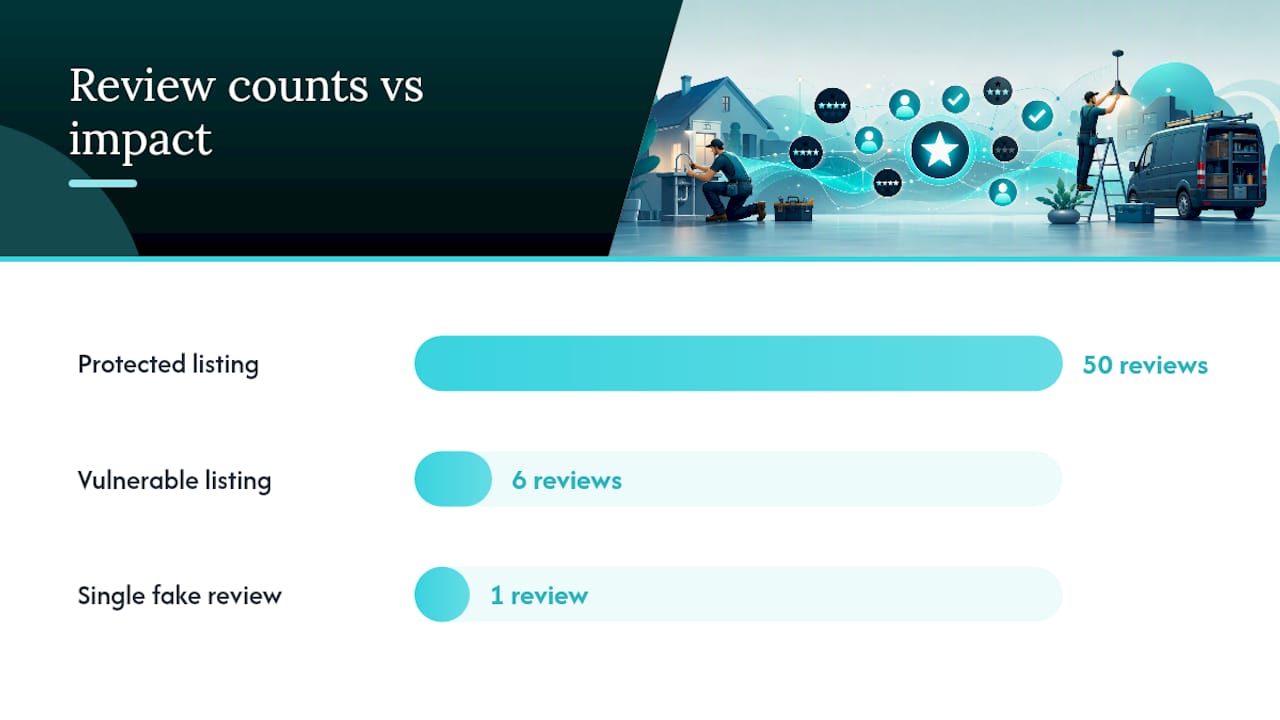
One fake one-star review barely dents a listing with fifty genuine ones behind it. It can wreck a listing that only has six. Steady, authentic review volume is your best long-term defense, and it starts with asking every real customer, not just the happy ones, right after the job wraps up.
- Send a text or email review request within a few hours of finishing the job, while the work is still fresh.
- Follow up once, three to four days later, if they haven't left one yet.
- Send a final, friendly nudge about a week out, then stop.
Never offer a discount or gift for a positive review only. Ask neutrally, every time, for every customer. Build a two-minute morning habit: scan your Google listing, flag anything that looks fake, and reply to anything real. Set up a system for gathering reviews without chasing people down so the flow keeps going even during your busiest weeks.
Pro Tip: After a fake-review incident, spend one week actively requesting reviews from every job you close. It's the fastest way to push the bad one further down the page.
Why Prevention and a Level Head Beat Any Quick Fix
Documentation, a calm reply, and a steady request habit will outperform panic every time. Paid "guaranteed removal" services often rely on shady tactics that violate platform rules, and you can end up flagged yourself. My own habit is simple: check the listing each morning with coffee in hand, and fire off a review request the same day a job wraps.
— jaras
An Honest Way to Keep One Bad Review From Sinking You
Some tools turn a finished job into a quote, then an invoice, then an automatic review request, so you're not the one remembering to chase feedback after a job. It's built for solo tradespeople who don't have time to manage a separate review-marketing tool.

The math is simple: a fake review carries less weight against a listing that gets fresh, real feedback every week. A review request feature can send that ask automatically the moment a job is marked done, using a three-touch sequence so you're not stuck typing out texts between service calls. That steady flow is exactly what keeps one bad-faith review from tanking your star rating while you wait on a platform to act. A third-party breakdown of automating Google review requests covers the same core idea if you want to see how the setup works elsewhere.
Try Quotewren free and see how quoting, invoicing, and and review requests fit together at App. Setup takes a few minutes, and the free trial lets you send real quotes and invoices before you commit to a paid plan.
Where to Report and Appeal Fake Reviews
Bookmark these before you need them: the FTC's fake review rule announcement, Google's review reporting and appeal page, and the FTC's step-by-step reporting guidance for suspicious reviews across platforms.
Sources
- Federal Trade Commission announces final rule banning fake reviews, testimonials
- Report inappropriate reviews on your Business Profile
- KJ K (analysis) — FTC fake review portal is live
FAQ
Can I Get a Fake Google Review Removed?
Yes, if it violates Google's content policies. Flag it through your Business Profile, use the Reviews Management Tool to name the exact policy it breaks, and appeal once if the first attempt is denied.
Why Did My Google Reviews Disappear?
Google's automated spam detection sometimes pulls down reviews in bulk, including real ones, when it detects unusual activity on your listing. Check your review count over a few days before assuming a fake review report caused the drop.
Why Is My Google Review Not Showing Up?
New reviews often take a few hours to a couple of days to appear because Google runs them through automated spam checks first. If a review still hasn't posted after several days, the system may have flagged it as suspicious on its own.
Should I Ever Pay Someone to Get a Fake Review Removed?
No. Services that promise guaranteed removal for a fee often use tactics that violate platform rules and can get your own account flagged. Stick to official reporting channels and documented appeals instead.
Can I Sue a Reviewer for a Fake Review?
You can, if the review contains a provably false factual statement rather than an opinion, but defamation suits are expensive and slow. Save every piece of documentation and talk to a lawyer before filing anything.
How Long Does It Take Google to Remove a Reported Review?
Most decisions come back within three to fourteen days after you submit a report, though complex cases involving an appeal can take longer.