
Yes, you can use ACH to pay and accept invoices. It's a low-cost, bank-to-bank transfer method that settles in 1–3 business days on the standard rail, or within the same banking day when you use Same Day ACH. Here's what to expect before you dive in:
- Settlement timing: Standard ACH takes 1–3 business days. Same Day ACH settles faster but has per-transaction limits and cutoff windows.
- Cost: ACH fees are typically a flat amount per transaction, far lower than the percentage-based fees on credit cards, especially on large invoices.
- Authorization: You must get explicit permission from your customer before pulling funds from their account. No authorization, no debit.
- Return risk: ACH is not instant-final cash. A payment can appear settled and still come back days later if the account is closed, has insufficient funds, or the customer disputes it.
If you're paying someone else's invoice, jump to the payer steps in section 4. If you're collecting from customers, the collector steps in section 5 are where you want to start.
Key Takeaways
ACH invoice payments are a low-cost, bank-to-bank method that requires upfront authorization, account verification, and a processor relationship, but they cut fees and admin work significantly compared to checks or cards.
| Point | Details |
|---|---|
| Authorization is non-negotiable | Get written customer authorization before every ACH debit and keep it on file for two years. |
| Settlement takes 1–3 business days | Standard ACH is not instant; Same Day ACH is faster but has cutoff windows and per-transaction limits. |
| ACH fees beat card fees on large invoices | Flat-fee ACH costs far less than a 2–3% card fee on invoices of $1,000 or more. |
| Verify accounts before pulling funds | Microdeposits or instant verification prevent returns and protect your cash flow. |
| Quotewren embeds pay links in invoices | Quotewren lets solo tradespeople send invoices with built-in ACH pay links, reducing follow-ups and speeding collections. |
Table of Contents
- How do ACH invoice payments actually work?
- Why businesses use ACH for invoices
- How to pay an invoice with ACH (payer steps)
- How to accept ACH for invoices (collector steps)
- What are the processing times and fees for ACH?
- What compliance rules apply to ACH invoice payments?
- How embedding pay links in invoices speeds up collections
- Your ACH setup checklist: get invoice-ready today
- The case for ACH that most guides miss
- Quotewren makes ACH invoicing simple for solo tradespeople
- Sources
- FAQ
How do ACH invoice payments actually work?
The ACH Network is a batch-based electronic payment system that moves money between U.S. bank accounts. Nacha governs the rules; the Federal Reserve and EPN (Electronic Payments Network) operate the clearing infrastructure. Think of it as a highway for bank-to-bank transfers, separate from card networks entirely.
Two directions of flow matter for invoices:
- ACH credit (push): You initiate a payment and push money out of your account to the payee. A plumber paying a supplier is a push.
- ACH debit (pull): You pull funds from your customer's account after they authorize it. A cleaning company collecting a monthly retainer is a pull.
SEC codes tell the ACH network what kind of transaction it is. For most small business invoice work, you'll encounter three:
- CCD (Corporate Credit or Debit): business-to-business transfers.
- PPD (Prearranged Payment and Deposit): consumer accounts, like a homeowner paying your invoice.
- WEB: consumer debits authorized online, such as through a hosted invoice pay page.
Your processor or bank usually assigns the correct code automatically based on account type and how the authorization was captured. You don't need to pick it manually, but knowing the codes helps when a return comes back with a reason code you may not recognize.
Settlement happens in batches, not in real time. Banks submit files at scheduled cutoff times throughout the day. FedACH Services process those batches and deliver funds according to a published schedule. Miss a cutoff and your payment rolls to the next window.
Why businesses use ACH for invoices
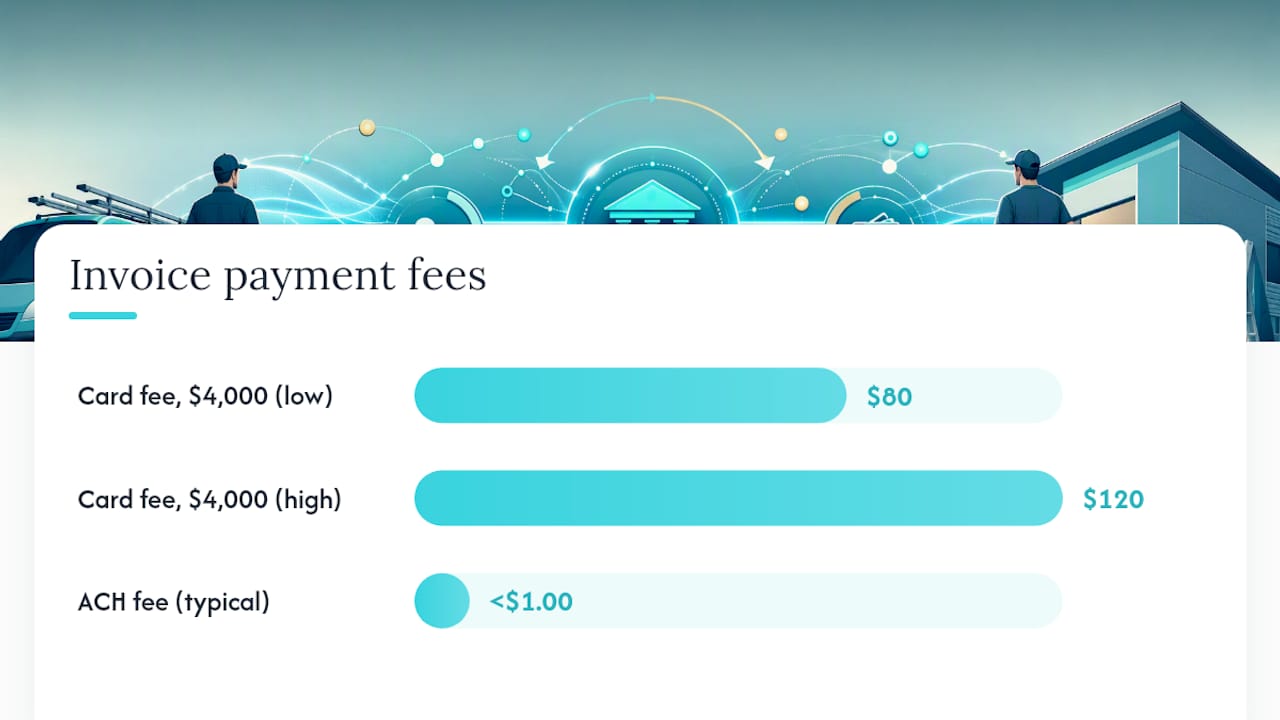
The clearest reason to use ACH for invoices is cost. On a $4,000 HVAC invoice, that's $80–$120 gone before you see the money. ACH fees are usually a flat amount per transaction, often well under $1.00 for standard transfers, making them far cheaper for high-value invoices.
Beyond cost, ACH cuts admin work. No printing checks, no trips to the post office, no waiting for a check to clear. When your invoicing software is connected to ACH processing, payments post directly and match to the right invoice automatically. Workday's research on automated invoice processing identifies manual data entry as the primary driver of reconciliation delays, and ACH with automation removes most of that manual work.
Security is another real advantage. ACH moves money account-to-account without exposing card numbers. Check fraud is a persistent problem for small businesses; ACH eliminates the physical check entirely, which removes one of the most common theft vectors.
Best use cases for ACH on invoices:
- High-value invoices where card fees would be painful ($1,000 and up)
- Recurring bills like monthly maintenance contracts or landscaping retainers
- Vendor payouts where both parties have business accounts
- Customers who prefer not to use a card
Pro Tip: ACH is not the right tool for urgent same-day transfers where you need guaranteed funds by a specific hour. For those situations, a wire transfer is faster and final. Use ACH when you have a day or two of lead time.
How to pay an invoice with ACH (payer steps)
If a vendor or contractor sends you an invoice and you want to pay by ACH, here's the exact process:
- Confirm the payee is legitimate. Before you enter any bank details, verify the invoice is from who it says it's from. Call the vendor on a number you already have, not one listed on a suspicious invoice.
- Get the routing and account number, or use their pay link. The payee will either give you their bank details directly or send a hosted pay link embedded in the invoice. The pay link is safer because you never handle raw account numbers.
- Choose how to initiate the payment. Three common options:
- Bank portal: Log into your business bank's bill pay or ACH transfer section and enter the payee's routing and account number manually.
- Accounting software: Tools like QuickBooks or FreshBooks let you initiate ACH payments directly from an open bill, which auto-posts the payment when it clears.
- Invoice-hosted pay page: Click the pay link in the invoice, enter your bank details once, and authorize the transfer. The payee's processor handles the rest.
- Include the invoice number in the memo field. This one step saves the payee from having to chase down which invoice your payment covers. It takes five seconds and prevents a follow-up call.
- Set your timing expectations. Standard ACH takes 1–3 business days from initiation to cleared funds. Same Day ACH is available if your bank supports it and you submit before the cutoff, typically mid-morning. A "pending" status means the file has been submitted but the funds haven't settled yet.
A quick timing note: if you initiate a payment on a Friday afternoon after the bank's cutoff, it won't process until Monday. Plan accordingly for invoices with due dates.
How to accept ACH for invoices (collector steps)
Collecting ACH payments from your customers takes a bit more setup than paying, but once it's running, it largely takes care of itself. Nacha's B2B Quick Start outlines the core requirements: authorization, account capture, and processor setup.
- Get written authorization before you pull a single dollar. Acceptable forms include a signed invoice with ACH terms, a written agreement, or a recorded electronic authorization through a hosted pay page. Keep a copy on file. If a customer disputes a debit, your authorization record is your defense.
- Collect routing and account numbers securely. The cleanest way is a hosted pay link or payment form that tokenizes the account data so you never store raw numbers yourself. If you collect details manually, use a secure form, not email.
- Set up an ODFI relationship. ODFI stands for Originating Depository Financial Institution. In plain English, it's the bank or processor that submits your ACH files to the network. Most small businesses handle this through a payment processor (which manages the ODFI relationship for you) or through their business bank's ACH origination service. For solo tradespeople, a payments-integrated invoicing tool is usually the simplest path.
- Verify the account before the first pull. Two main methods:
- Microdeposits: Two small amounts (under $1.00 each) are deposited into the customer's account. They confirm the amounts to verify. Takes 1–2 business days.
- Instant account verification: The customer logs into their bank through a secure link (services like Plaid power many of these flows). Verification happens in seconds. Stripe's ACH Direct Debit documentation covers both methods for hosted invoice pages.
- Reconcile payments as they settle. Match each ACH entry to the open invoice in your accounting system. Most invoicing platforms do this automatically when a pay link is used. For manual entries, match by amount and date, then close the invoice.
Pro Tip: Run a $1.00 test transaction with your own bank account before you go live with customers. It confirms your processor setup is correct and catches errors before a real invoice is on the line.
Watch for returns. A payment can clear and still come back. Common return reasons include insufficient funds (R01), account closed (R02), and unauthorized debit (R10). Build a returns-handling step into your process: check your processor dashboard weekly and follow up with the customer promptly when a return hits.
What are the processing times and fees for ACH?
Settlement timing depends on which rail you use and when you submit:
- Standard ACH: 1–3 business days. Most common for invoice payments. Funds are typically available the next business day after the receiving bank posts the credit.
- Same Day ACH: Settles within the same banking day if submitted before the cutoff window. The Federal Reserve's FedACH Services support multiple Same Day ACH windows, but each has a hard cutoff time. Check your processor's specific schedule.
- Weekends and holidays: ACH does not process on federal banking holidays or weekends. A payment submitted Friday evening settles Monday at the earliest.
Batch cutoff times matter more than most people realize. If your processor submits files at 2:00 PM and you initiate a payment at 2:05 PM, you've missed that window. Your payment goes in the next batch.
On fees: ACH is significantly cheaper than card processing. While exact pricing varies by bank and processor, flat-fee ACH transactions typically cost a fraction of what a percentage-based card fee would on the same invoice amount. Nacha's ACH Payments Fact Sheet notes ACH's cost advantage as one of its primary benefits for B2B use.
One caveat: some processors charge a return fee on top of the transaction fee when a payment comes back. Factor that into your cost model, especially if you're working with new customers whose accounts you haven't verified.
What compliance rules apply to ACH invoice payments?
Nacha rules are the governing framework for every ACH transaction in the U.S. The Federal Reserve's Operating Circular 4 incorporates those rules and governs how commercial ACH items are cleared and settled. For small businesses, the practical compliance list is short but non-negotiable.
Core requirements:
- Written authorization before every debit. For recurring debits, the authorization must specify the amount, frequency, and the account being debited. For one-time debits, a clear one-time authorization is sufficient.
- Correct SEC code. Using PPD for a business account or CCD for a consumer account is a Nacha rule violation. Your processor usually handles this, but confirm.
- Retain authorization records. Nacha requires you to keep authorization records for two years after the last transaction under that authorization. Store them somewhere you can retrieve them quickly.
- Consumer vs. business accounts: Consumer accounts (PPD) carry stronger protections, including a longer window for unauthorized debit disputes. Business accounts (CCD) have a shorter dispute window. Know which type your customer has.
Common risks and how to manage them:
- Returns: ACH processing guidance from Plaid notes that in certain consumer-debit contexts, returns can be processed up to 60 days after settlement. Don't spend funds you've received via ACH until you're confident the return window has passed for that transaction type.
- Fraud: Verify accounts before pulling funds. Use tokenization so raw account numbers aren't sitting in your system. Set transaction limits and monitor for unusual patterns.
- Unauthorized debit claims: If a customer claims they didn't authorize a debit, your signed authorization is the only thing that protects you. Keep it.
Pro Tip: Create a simple folder, digital or physical, for each customer that holds their ACH authorization form and the date you first debited their account. Two minutes of filing now saves hours of dispute resolution later.
How embedding pay links in invoices speeds up collections
Adding an ACH pay link directly to your invoice is the single biggest lever for getting paid faster. When a customer receives an invoice with a clickable payment option, they can pay in minutes without calling you for bank details or mailing a check. Nacha's B2B Quick Start specifically supports embedding pay links as a way to reduce friction and speed collections.
Here's a realistic example. A plumber finishes a water heater replacement on a Thursday afternoon. The invoice goes out that evening with a pay link. The homeowner clicks it Friday morning, authorizes the ACH debit through the hosted page, and the funds are in transit by Friday afternoon. With Same Day ACH, the plumber could see cleared funds the same day. Without the pay link, the homeowner might mail a check that arrives the following week, or forget entirely.

Workday's research on invoice automation makes the case plainly: removing manual steps from the invoice-to-payment cycle cuts the time between invoice and cash. ACH with embedded pay links does exactly that.
Integration checklist:
- Enable ACH in your invoicing tool's payment settings
- Add authorization language to your invoice template (one sentence is enough for one-time debits)
- Offer instant account verification or microdeposits as the customer's verification option
- Set up auto-match so payments post to the correct invoice without manual entry
- Test the full flow with your own account before sending to a customer
Pro Tip: When you send the invoice, add one line in the message body: "You can pay securely by bank transfer using the link below — no card needed." Customers who are card-averse or who want to avoid card fees will appreciate the option and often pay faster.
Your ACH setup checklist: get invoice-ready today
Work through these steps in order. Each one builds on the last.
- Open or confirm your business bank account. ACH requires a business checking account. Personal accounts create compliance and tax complications.
- Choose your ACH processor or bank origination service. Most invoicing platforms include ACH processing. If yours doesn't, contact your bank about ACH origination or add a payment processor that manages the ODFI relationship.
- Add authorization language to your invoice template. One sentence works: "By paying this invoice via ACH, you authorize [Your Business Name] to debit the account you provide for the amount shown."
- Set up account verification. Enable microdeposit or instant verification in your payment settings before you accept the first payment.
- Enable ACH pay links on your invoices. Turn on the feature in your invoicing tool and test the link yourself.
- Run a $1.00 test transaction. Use your own bank account. Confirm the deposit appears, then confirm the return (refund) processes correctly.
- Set up reconciliation rules. Configure your accounting software to auto-match ACH payments to open invoices by amount and reference number.
- Create an authorization file system. A folder per customer with their authorization form and first-debit date is enough.
- Review your processor's return fee policy. Know what you'll be charged if a payment comes back, and factor it into your pricing for high-risk accounts.
- Schedule a weekly dashboard check. Look for returns, pending items, and failed verifications every Monday morning. Catching issues early keeps cash flow predictable.
Quick contacts to have ready:
- Your bank's ACH origination or treasury services desk
- Your invoicing platform's support line for payment setup questions
- Nacha's website for rule clarifications: nacha.org
The case for ACH that most guides miss
Most ACH guides are written for finance teams at mid-size companies. They assume you have an AP department, an ERP system, and a dedicated treasury manager. If you're a solo electrician or a two-person HVAC crew, that advice lands sideways.
The real value of ACH for tradespeople isn't the technical infrastructure. It's the time you stop spending chasing checks. Every invoice that gets paid via a pay link the same day it's sent is a follow-up call you never have to make. That's an hour back in your week, every week. When you multiply that across a full year of jobs, the admin savings are as real as the fee savings.
The compliance side is simpler than it looks, too. Get authorization, keep a record, verify the account. That's most of it. The rest is your processor's job.
Quotewren makes ACH invoicing simple for solo tradespeople
If you're a solo tradesperson who wants to send professional invoices with embedded pay links and stop chasing payments, Quotewren is built for exactly that workflow. You finish a job, generate a branded invoice in minutes, and your customer gets a pay link they can use right away. No separate payment portal to set up, no manual reconciliation, and no chasing checks.

After the payment clears, Quotewren's three-touch SMS review request goes out automatically, so you're collecting Google reviews while you're already on the next job. The whole loop, quote to invoice to payment to review, runs with minimal effort on your end.
Start your free trial at Quotewren and send your first ACH-ready invoice today.
Sources
- ACH Payments Fact Sheet | Nacha
- FedACH Services | Federal Reserve Financial Services
- Automated invoice processing: Everything You Need to Know | Workday
This article is general information, not a substitute for advice from a qualified financial advisor. Consult a qualified financial professional about your own circumstances before acting on anything here.
FAQ
Can you pay an invoice with ACH?
Yes. You can pay any invoice by ACH as long as the payee provides their routing and account number or a hosted pay link. Initiate the transfer through your bank portal, accounting software, or the invoice's pay page.
Is there a downside to ACH payments?
The main downsides are settlement delay (1–3 business days for standard ACH) and return risk. A payment can appear to clear and still be reversed days later for reasons like insufficient funds or a closed account, so don't treat ACH funds as final until the return window has passed.
How do I accept ACH payments from my customers?
Get written authorization from each customer, collect their routing and account number through a secure pay link or form, verify the account via microdeposits or instant verification, and use a payment processor or your bank's ACH origination service to submit the debit. Keep the authorization on file for two years.
How do I pay someone with ACH?
Log into your bank's online portal or use your accounting software, enter the payee's routing and account number (or click their pay link), include the invoice number in the memo field, and submit. Funds typically arrive within 1–3 business days.